TL;DR
- Google's enhanced conversions update rolls out fully in June 2026, replacing the separate enhanced conversions for web and for leads with a single unified toggle.
- User-provided data such as email addresses, phone numbers and home addresses is hashed with SHA-256 before it is sent, then matched against signed-in Google accounts.
- Advertisers can now send data through website tags, Data Manager in Google Ads and API integrations at the same time, with Google deduplicating signals so nothing is double-counted.
- Account-level setup runs through Goals, then Settings, then the Customer data use section, and requires accepting Google's Customer Data Terms; under an MCC the terms usually have to be accepted per individual account.
- Compliant advertisers will be migrated automatically, but before June they should confirm their tags or API integration actually send the expected fields and that data terms are accepted on every account.
- What Google Ads Enhanced Conversions Actually Are (And Why They Matter)
- What Is Changing: The Unified Toggle and Multi-Source Data Input
- How to Enable Enhanced Conversions in Google Ads Right Now
- What This Means for Your Google Ads Performance and Bidding Strategy
Conversion tracking has always been one of the messier parts of running Google Ads. You do the setup, watch the numbers come in, and then quietly start wondering whether any of it reflects reality. Cookies get blocked. People switch devices mid-purchase. Attribution gaps widen. And at some point, you’re not sure whether to trust the data you’re optimizing toward.
Google is making a significant change to address this, with a full rollout in June 2026. The headline update is a single unified toggle that replaces the old split between enhanced conversions for web and leads. Alongside that, advertisers can now send user-provided data through multiple channels at the same time, which closes some of the gaps that made conversion matching inconsistent.
If you’ve been avoiding enhanced conversions because the setup felt fiddly, this update is genuinely more approachable. If you’re already using it, there are specific things you’ll want to know before June. This guide covers the basics, what’s actually changing, how to set it up, and what it means for your campaigns.
What Google Ads Enhanced Conversions Actually Are (And Why They Matter)
Before getting into what’s changing, it helps to understand what enhanced conversions actually do and why they exist.
The Problem Enhanced Conversions Were Built to Solve
Standard conversion tracking in Google Ads runs on cookies. Someone clicks your ad, buys something, and a cookie connects that action back to the click. Clean in theory. In practice, it breaks constantly.
Safari and Firefox block third-party cookies by default. iOS privacy changes have made cross-app and cross-browser tracking harder than it used to be. Buyers move between their phone and laptop during the same purchase. Ad blockers kill tracking pixels before they fire. Each of these creates a gap, and those gaps matter because Google’s automated bidding relies on that data to make decisions. Incomplete signals mean worse optimization.
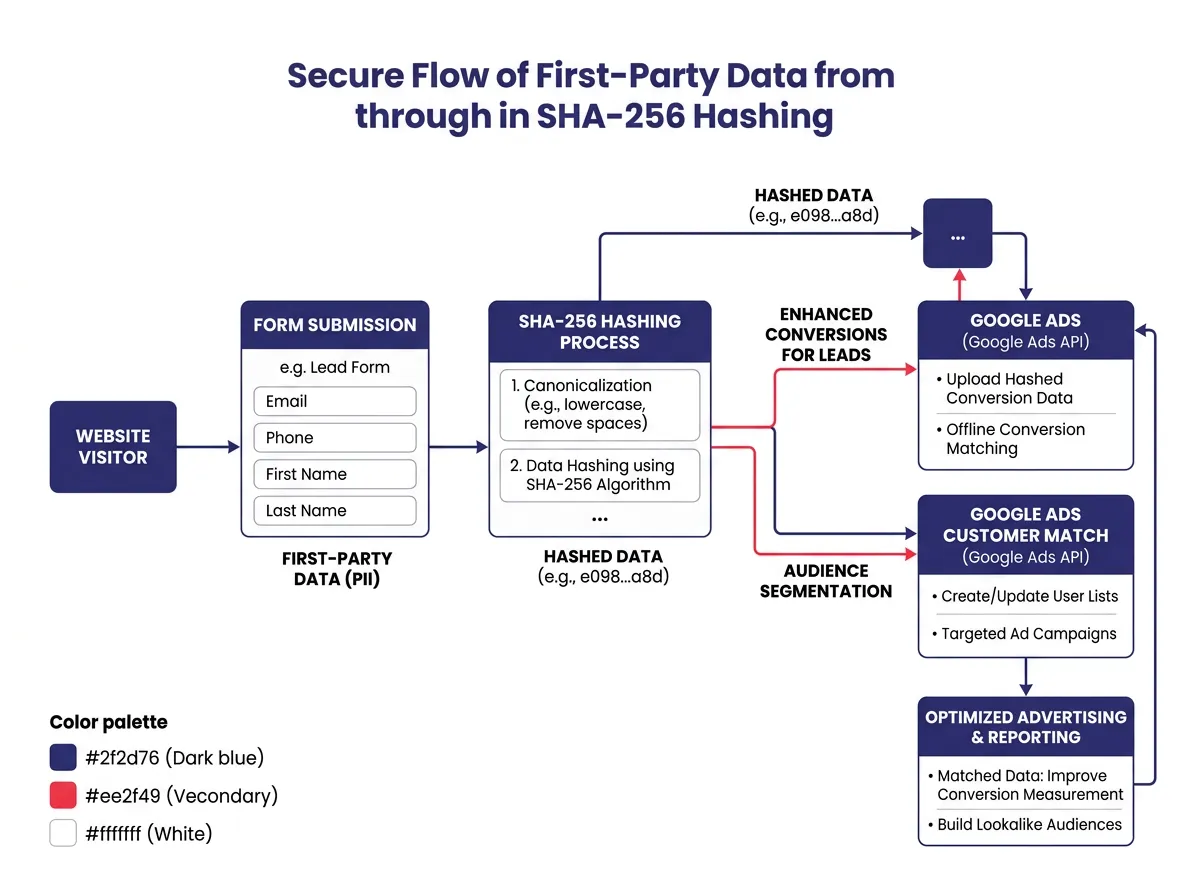
Enhanced conversions in Google Ads were built to patch those gaps using first-party data. Rather than depending entirely on cookies, the system captures user-provided information (email addresses, phone numbers, home addresses) directly from your website, usually from form submissions or checkout flows. Before anything gets sent to Google, that data is hashed with SHA-256 encryption, so the raw personal details stay protected. Google then compares that hashed data against signed-in Google accounts to match conversions that would otherwise go missing.
How User-Provided Data Improves Conversion Matching
The matching works because a large portion of web users stay signed into Google accounts across devices and browsers. When someone submits a form with their email, the hashed version of that address can be matched against the same person who clicked your ad, even if the cookie was blocked or the session happened on a different device entirely.
This doesn’t replace cookies. It works alongside existing tracking to recover conversions that would otherwise be lost. Most advertisers who implement enhanced conversions see more reported conversions as a result, not because more people are converting, but because more real conversions are getting counted.
Third-party tracking keeps getting restricted across the web, and that’s not a temporary situation. First-party data has become the realistic foundation for accurate Google Ads attribution, and enhanced conversions are Google’s main tool for making that work. The 2026 update is meant to make the whole thing easier and more effective.
What Is Changing: The Unified Toggle and Multi-Source Data Input
The biggest part of the 2026 update is the consolidation of enhanced conversions into one feature. Here’s what that looks like in practice.
From Two Features to One: Enhanced Conversions Gets Simplified
Until now, enhanced conversions came in two flavors with separate setups. Enhanced conversions for web handled purchase-based conversions on your site. Enhanced conversions for leads was for lead gen situations where conversions happen offline or through a CRM, and the user data comes from a lead form rather than a completed sale.
Running both meant separate configurations. It also wasn’t always obvious which applied to your business, especially if you had both e-commerce and lead gen campaigns running simultaneously.
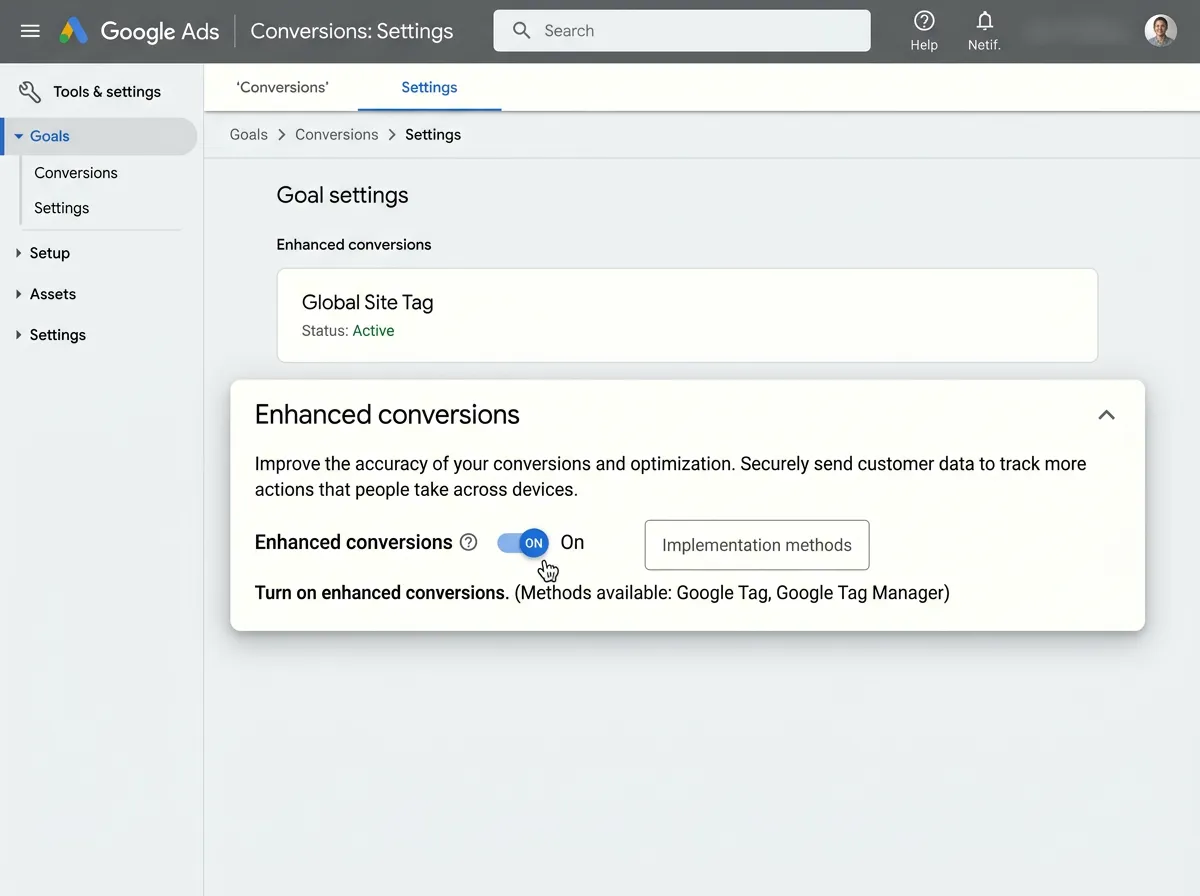
The 2026 update removes that split. Both versions are replaced by a single unified enhanced conversions feature with one toggle. Whether you’re tracking purchases, form submissions, or phone leads, it all goes through the same setup. This is a real improvement. The old two-version structure confused a lot of advertisers and was one of the main reasons people put off setting it up.
Sending Data Through Multiple Channels at the Same Time
The other meaningful change is how user-provided data can now reach Google. Previously, you had to pick one implementation method: Google Tag Manager, a direct website tag, or an API integration.
That restriction is gone. Advertisers can now send data through website tags, through Data Manager in Google Ads, and through API integrations at the same time. Google deduplicates the signals on its end, so there’s no double-counting if the same event comes through more than one channel.
This matters because different parts of your tech stack often capture different pieces of user data. Your website tag might grab a checkout email. Your CRM integration might add additional match fields. Letting both contribute at once gives Google more to work with during conversion matching, which improves accuracy without requiring you to tear down and rebuild your data pipeline around a single method.
If you’re already using Google Tag Manager, a direct tag, or the Google Ads API, your existing setup stays intact. You can add additional sources through Data Manager Google Ads, which works as the central hub for connecting first-party data to your campaigns.
How to Enable Enhanced Conversions in Google Ads Right Now
Whether you’re setting this up fresh or updating your configuration before the June 2026 rollout, here’s how the process works at both the account and conversion action level.
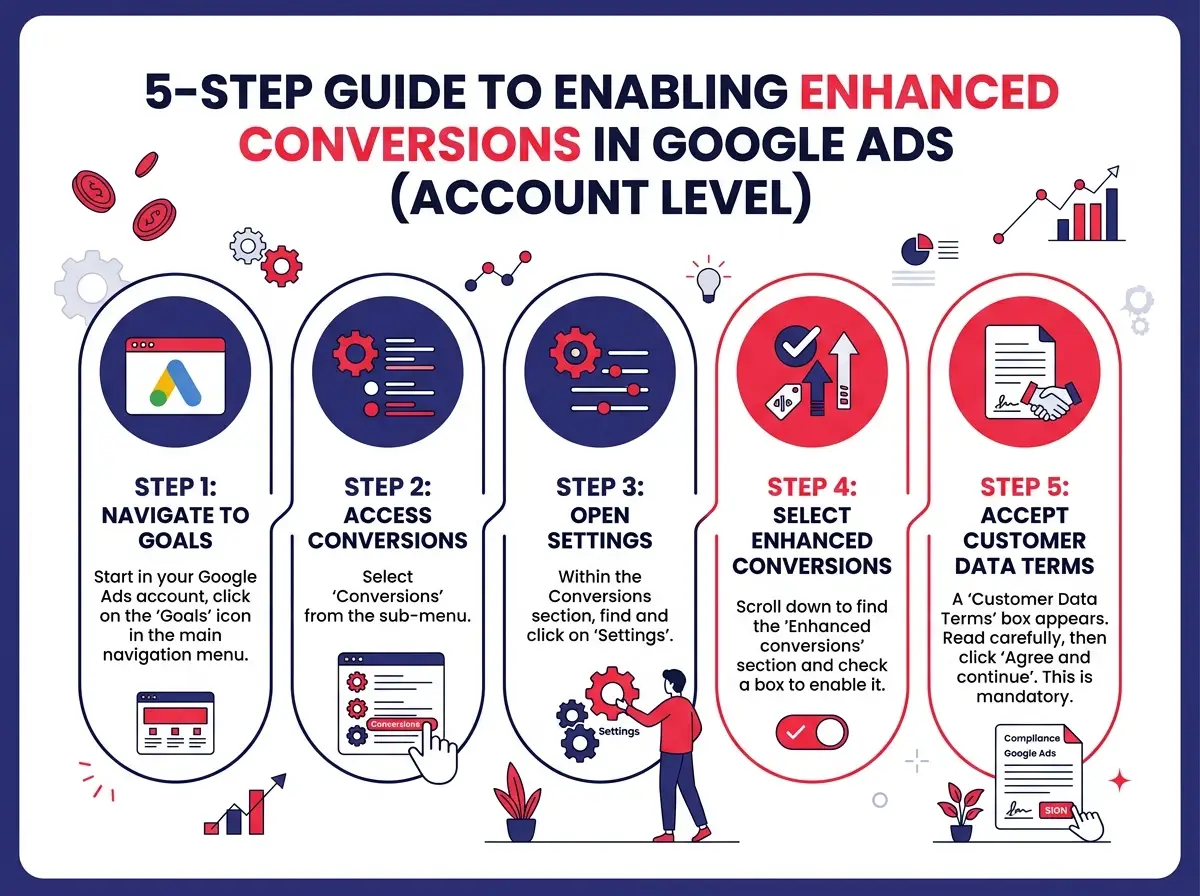
Enabling Enhanced Conversions at the Account Level
Account-level setup applies enhanced conversions across your full Google Ads account. It’s where you start.
Here’s the path:
- Sign into your Google Ads account
- Click on Goals in the left navigation menu
- Select Settings under the Goals section
- Find the Customer data use section
- Toggle on enhanced conversions
- Accept Google’s Customer Data Terms (sometimes called Google Data Processing Terms depending on your account configuration)
Accepting the terms is required. Without that step, the feature won’t activate even with the toggle switched on. Google uses those terms to define how user-provided data can be processed and matched.
One thing worth noting: if you’re managing accounts under an MCC, you’ll likely need to accept the data terms at the individual account level rather than at the manager level. Check each account separately if you’re managing multiple clients.
Setting It Up at the Conversion Action Level
Turning on the feature at the account level is step one. You also need to enable enhanced conversions for specific conversion actions where you want it applied. This lets you use it selectively rather than applying it to every conversion type by default.
To enable it at the conversion action level:
- Go to Goals, then Conversions, then Summary
- Click on an existing conversion action or create a new one
- In the setup or edit flow, find the Enhanced conversions section
- Toggle it on for that specific action
- Accept the data terms again if prompted at this level
You can also opt out for specific actions here. Phone call conversions or some app-based conversions may not have the same opportunity to collect user-provided data as a form submission or checkout event, so being selective is reasonable.
For data collection to work, your website tag or Google Tag needs to be set up to capture and hash the relevant user-provided fields. In Google Tag Manager, there are built-in variables for this in the Google Ads tag template. If you’re using the Google Ads API, the relevant field is UserIdentifier in the conversion upload specs.
For most advertisers, the Google Ads conversion tracking setup for enhanced conversions doesn’t require a major overhaul. The main thing to confirm is that the right fields are being collected at the point of conversion, whether that’s a thank-you page, a form confirmation, or a checkout complete event.
What This Means for Your Google Ads Performance and Bidding Strategy
Getting the setup right matters, but the real question is what this does for actual campaign results.
Better Conversion Data Means Smarter Automated Bidding
Google’s Smart Bidding strategies, Target CPA and Target ROAS in particular, depend on conversion signals to function. The algorithm learns what a converting user looks like and adjusts bids in real time to find more of them. When conversion data has gaps because of blocked cookies or cross-device journeys, that learning process is working with incomplete information and making suboptimal decisions because of it.
Enhanced conversions fill in some of those gaps. When more real conversions get reported accurately, Smart Bidding has better signals to work from. Target CPA campaigns can identify high-converting audiences more precisely. Target ROAS campaigns have more reliable data to hit their return targets without overspending on low-quality traffic.
The improvement won’t always be dramatic right away, especially for accounts already running high conversion volumes. But for accounts with moderate data, or those in competitive categories where every signal counts, more complete conversion data translates into better bidding over time.
Enhanced conversions can also recover view-through and cross-device conversions that would otherwise go unrecorded. For advertisers running video alongside search, this gives a more complete picture of how the full funnel is performing, not just what’s visible in last-click attribution.
What Existing Advertisers Need to Do Before June 2026
If you’ve already set up enhanced conversions and accepted the customer data terms, the move to the unified feature is mostly automatic. Google has confirmed that compliant advertisers will be migrated without manual action required.
That said, a few things are worth doing before June:
Review your current implementation. Check that your website tag or API integration is actually sending the expected user-provided fields. It’s common for enhanced conversions to be enabled in Google Ads but for no data to actually flow because the fields aren’t being captured correctly at the tag level.
Explore Data Manager. The unified update puts Data Manager Google Ads at the center of how multi-source data input works. If you haven’t connected any data sources there yet, it’s worth exploring whether adding a CRM or first-party data feed would improve your match rates.
Review your conversion action settings. With the shift to a unified feature, look at which conversion actions have enhanced conversions enabled and whether any need adjusting to fit the new structure.
Verify data terms acceptance. If you manage multiple accounts or have added new accounts recently, confirm that the data terms are accepted across all of them. Accounts without accepted terms won’t benefit from the feature after the June rollout.
For new advertisers, the path is more straightforward than it used to be. The unified setup removes the old question of which version to use. It’s a matter of enabling the toggle, accepting the terms, and confirming your tag is collecting the right data.
The broader context here is worth stating plainly. Browser privacy standards keep tightening. Regulatory pressure on third-party tracking keeps growing. That’s not reversing. Advertisers who build solid first-party data pipelines connected to their Google Ads accounts will be in a better position as these changes compound. Enhanced conversions, particularly in the new simplified form rolling out in 2026, are one of the more practical ways to start making that happen now.