TL;DR
- Anthropic launched Claude Design on 17 April 2026 as an experimental product that turns a typed description into polished visuals through conversation, with no design software experience required.
- Finished designs export to Canva, PDF, PPTX and HTML, with Claude Design sitting upstream as the ideation layer and Canva handling final editing and collaboration.
- During setup Claude Design reads a company's existing codebase and design files to build a design system, then applies those brand colours, typography and component styles to every project automatically.
- Designs can be handed to Claude Code for development in a single step, and the product follows Claude Cowork, the agentic collaboration product Anthropic launched in January 2026.
Most founders and product managers have been in this exact situation. You’re in a meeting, pitching something you can picture clearly, and the room just isn’t following you. You try different words, draw something on a whiteboard, maybe wave your hands a bit, and still the idea doesn’t land. The gap between having a clear concept and actually being able to show it to people has always been a real problem, especially for anyone who didn’t come up through design.
Anthropic launched Claude Design on April 17th, 2026, as an experimental product built specifically to close that gap. It lets non-designers produce polished visual work through nothing more than a typed description and a conversation. No design software experience needed. No waiting around for a designer to free up.
The tool isn’t positioned as a Canva killer or a threat to design teams. It’s built to be the fastest path from a raw idea to something you can actually show people, with direct export into Canva, PDF, PPTX, HTML, and more. For business professionals who have always depended on designers to make their ideas visible, Claude Design changes when in the process that happens, and that’s a bigger deal than it might sound.

- What Claude Design actually does and who it’s built for
- How Claude Design fits into your team’s existing workflow
- Claude Design inside Anthropic’s broader enterprise push
What Claude Design actually does and who it’s built for
Before getting into workflow specifics, it’s worth understanding what the product does at a basic level, because the name alone doesn’t tell the full story.
From text prompt to working prototype in minutes
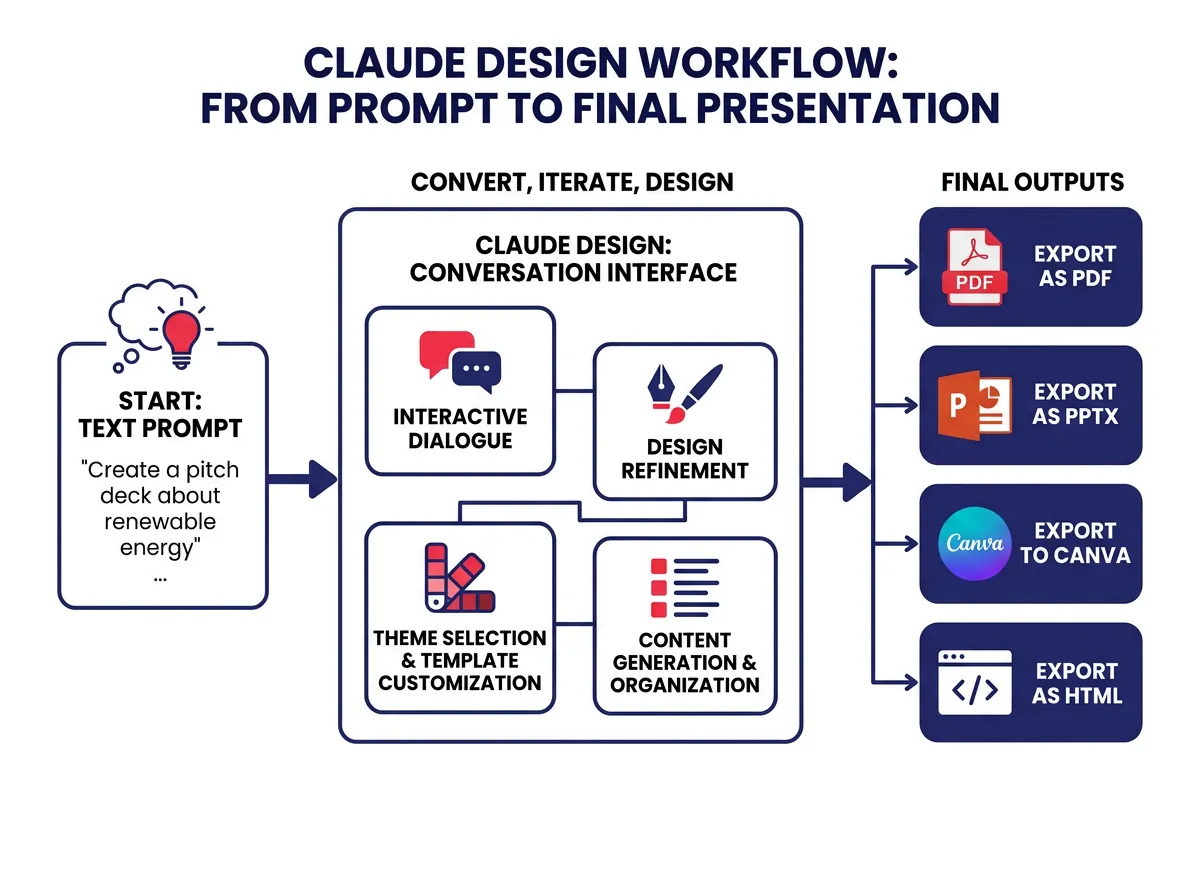
Claude Design is an AI-powered visual generation tool that takes plain language descriptions and turns them into actual visual outputs. You type something like “create a product overview slide for our Q3 sales deck, focused on our inventory management software, with a clean professional look,” and Claude generates an initial version you can see and interact with right away.
That’s just the starting point, though. What separates Claude Design from earlier AI image tools is what happens after that first output. You can refine the design through natural conversation, the same way you’d give feedback to a designer sitting next to you. You can leave inline comments on specific parts of the visual. You can make direct edits when you know exactly what change you want. And here’s something that genuinely surprised me when I read about it: Claude Design can build custom sliders inside the interface, letting you adjust things like tone, information density, or style without writing out a new prompt for every variation.
That’s a meaningfully different experience from typing something and hoping the next version is closer to what you had in mind. The feedback loop feels conversational rather than trial-and-error, which matters when you’re under time pressure or trying to get multiple stakeholders aligned on what something should look like.
The outputs cover the range of assets most business teams actually need. Pitch deck slides, product mockups, landing page concepts, one-pagers, internal presentation materials, early-stage prototypes you can hand to a developer or a design team for further polish.
The business roles that benefit most
Claude Design is built for people who need to communicate ideas visually but aren’t working inside a design tool to do it. That fits a pretty specific set of roles.
Founders and early-stage teams are an obvious fit. You almost never have a full design team available, and you regularly need to show investors, potential customers, or future hires what something looks like before it fully exists. Generating a credible mockup or deck in minutes rather than waiting days changes the entire rhythm of those early conversations.
Product managers run into this constantly. PMs have to communicate product vision to engineering, design, marketing, and leadership, all of whom think about products differently. A quick visual generated through Claude Design can align a room faster than a written spec or a verbal walkthrough.
Account executives and sales professionals benefit when they need to customize pitch materials quickly for a specific prospect. Building a tailored one-pager no longer means going back to marketing and waiting in the queue.
Marketing professionals who want to test messaging concepts or sketch out campaign ideas before committing budget or creative time get a real advantage too. Claude Design gives them a way to share an idea before it’s fully formed, which is often exactly when the most useful feedback comes in.
What all these roles share is that they produce and consume a lot of visual communication without being trained to create it themselves. That’s the gap Claude Design is built for.
How Claude Design fits into your team’s existing workflow
The first question most practical people ask about any new tool is simple: does this fit with what we already use? A tool that requires you to rebuild your process from scratch is one most teams won’t adopt, no matter how good the demos look.
Anthropic built integration into Claude Design from the start, and the answers here are actually pretty practical.
Your brand system, applied automatically
One of the more impressive things Claude Design does is handle brand consistency without requiring you to configure it manually on every project. During setup, Claude Design reads a company’s existing codebase and design files to build a design system. It learns your brand colors, typography, component styles, and visual conventions from files you already have.
Once that system is in place, it applies to every project automatically. Every visual Claude Design produces for your team starts from your brand standards rather than a generic template. For anyone who has received a “quick design” from a well-meaning colleague that was in completely the wrong fonts and colors, this feature alone solves a real headache.
This matters especially for enterprise teams. Large organizations spend real money on brand consistency, and tools that ignore those standards create cleanup work downstream. Claude Design enforces consistency as a default rather than asking someone to remember to check a box.
In practice, a product manager or account executive can produce on-brand materials independently without routing everything through marketing or design for a review. That frees up designer time for higher-complexity work while giving business teams more autonomy over their daily communication needs.
Importing, sharing, and exporting without friction
Getting work out of a tool and into the right hands matters just as much as creating it in the first place. Claude Design offers several export and handoff paths that cover most scenarios a business team will encounter.
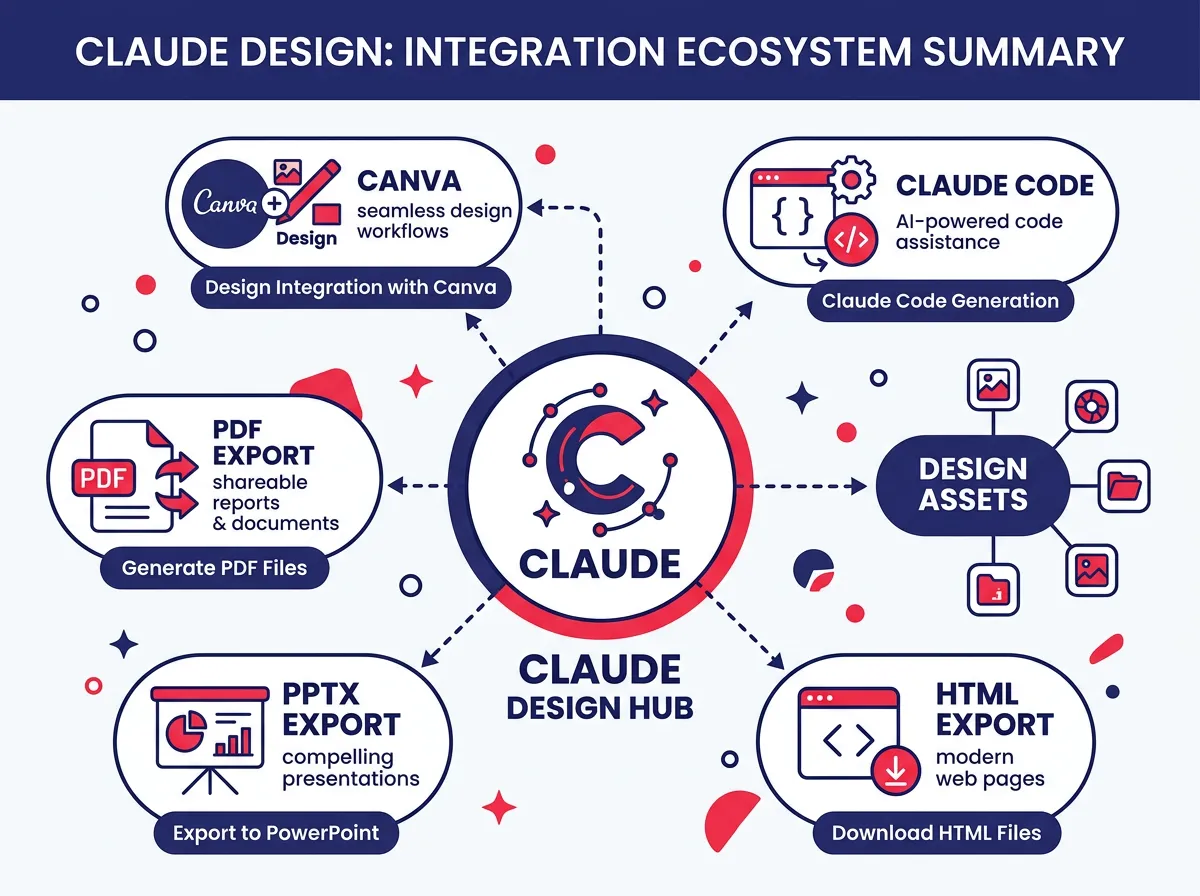
Finished designs can be exported as PDFs or PPTX files that drop directly into existing slide decks or document workflows. For web-ready outputs, you can export standalone HTML files to share with a link or hand off to a development team.
The Canva integration deserves specific attention. Designs can be pushed directly to Canva, where they become fully editable and collaborative. This is smart positioning because it acknowledges that Canva is already embedded in many teams’ workflows. Rather than asking you to abandon it, Claude Design fits in upstream as the ideation and generation layer, with Canva handling final editing and collaboration.
For technical teams, designs can be handed off to Claude Code for development in a single step. A product manager who generates a mockup in Claude Design can kick off the development process from the same interface, without manually translating a visual into a technical brief.
That kind of connected handoff is what separates a genuinely useful workplace tool from a demo that impresses in a presentation but creates friction every day after.
Claude Design inside Anthropic’s broader enterprise push
Claude Design didn’t show up in isolation. It’s part of a pattern Anthropic has been building for months, and that context matters.
A pattern of agentic tools built for the enterprise
In January 2026, Anthropic launched Claude Cowork, a collaboration product with a set of agentic plug-ins designed to help enterprise teams work more efficiently alongside AI. Claude Design follows that same trajectory. These aren’t standalone features bolted onto a chat interface. They’re purpose-built tools aimed at specific workplace workflows, and they’re designed to connect with each other.
The strategy here seems pretty deliberate. Rather than competing purely on model capability, Anthropic is building a connected suite of AI-powered workplace tools with the apparent goal of embedding Claude deeply enough in daily business processes that it becomes infrastructure rather than something people optionally reach for.
For enterprise buyers evaluating AI investments, this changes the framing. A connected suite that covers ideation, visual production, collaboration, and development handoff is a different value proposition than a single AI assistant. It shifts the conversation from “what can this chatbot do?” to “how much of our current tool stack does this improve or replace?”
Where Claude Design sits alongside the competition
Claude Design runs on Claude Opus 4.7 and is currently available in research preview for Pro, Max, Team, and Enterprise subscribers. The research preview label means Anthropic is still iterating based on real feedback, which is worth knowing if your team is evaluating it for anything mission-critical right now.
The Canva comparison will come up in most internal conversations, so it’s worth addressing directly. Canva is a polish and collaboration tool. You go there when you have a direction established and need to produce, refine, and share materials at scale. Claude Design targets the stage before that, when you’re still figuring out what something should look like and what it needs to communicate.
Since they’re aimed at different stages of the design process, they’re more complementary than competitive. The direct Canva export from Claude Design actually reinforces this. Anthropic isn’t trying to replace Canva in your workflow. They’re trying to add something useful that sits in front of it.
Compared to other AI visual tools, Claude Design’s conversation-based refinement model and automatic brand application set it apart in practical ways. Plenty of competing tools generate images or mockups, but few give you the kind of back-and-forth collaboration that makes output genuinely usable in a professional context rather than just visually interesting.
For business professionals who have spent years either waiting on design resources or apologizing for rough sketches in meetings, Claude Design represents a real shift in how quickly an idea becomes something shareable. Most teams won’t struggle to see the value. The question is just how fast they get comfortable making it part of how they actually work.