
TL;DR
- Shopify locks URL prefixes: products sit under /products/, collections under /collections/, pages under /pages/ and articles under /blogs/ plus a blog name segment. No setting or app changes this.
- One product is reachable at /products/handle and also at /collections/handle/products/handle. Standard themes emit a canonical tag from the collection path back to the product path, so it is not duplicate content unless a theme edit removed the tag.
- Shopify generates sitemap.xml automatically and you cannot hand-edit it. Publication status per page is the only control. robots.txt has been editable since 2021 through a robots.txt.liquid template in the theme.
- Compare the page count in your sitemap against discovered pages in Google Search Console. Far more discovered means filter and sort parameters. Far fewer indexed means content and internal links, not the platform.
- Most slow Shopify stores are slow because of accumulated apps injecting scripts on every page, not because of the theme. Count external domain requests in the browser network tab.
Shopify SEO is the work of getting a store built on Shopify found on Google inside a set of technical rules the platform fixes for you and does not let you change, including a locked URL structure, a sitemap file the system generates on its own, and page head code you can only reach through theme files. The direct answer to whether Shopify is good for SEO is this: it is good at the technical basics that most self-assembled stores get wrong, and it is restrictive about URL structure and server-level control, which are two things you have to accept and then design around.
This article is a diagnostic, not an implementation checklist. The goal is to let you tell which of your store's SEO problems come from Shopify itself and which are ordinary SEO problems that any website on any platform would have. Not being able to separate those two is why a lot of store owners spend months trying to fix things that cannot be fixed while leaving the fixable things untouched.
What Shopify SEO is
Shopify is a fully hosted store platform. You do not own the server, you have no file system access, and there is no .htaccess file and no server log to read. SEO on Shopify is therefore different from SEO on a site where you control the server, because the question stops being how to do something and becomes how much the platform will let you do. The real work happens in three layers: the per-page fields you fill in the admin, the theme files written in Liquid, and the handful of files the platform opens up as a special case.
Shopify renders Liquid on the server, which means the main content of a product page, the title, the price, the description and the internal links, is in the HTML the moment the server returns the page. It is not filled in later by JavaScript. That is an advantage people overlook, because it means Googlebot reads your products without waiting for a second rendering pass. Rendering problems on Shopify usually do not come from the platform. They come from third-party apps that inject content after load, such as review blocks, product filters or related-product widgets. Injected content is content you have to prove gets indexed, not content you can assume is safe.
What Shopify SEO is not matters just as much. It is not installing an app and calling it done. It is not turning every score in an app's report green. And it is not trying to remove the words collections or products from your URLs, which cannot be done on this platform. Knowing what sits outside your control from the start saves more budget than any technique.
Is Shopify good for SEO
The honest answer is that Shopify gets the technical basics right on day one better than most hand-built stores, and you pay for that by permanently giving up some control. That is a trade-off, not a verdict. A store with a few hundred products competing on content and brand will barely feel the constraints. A store with tens of thousands of products, complex filtering and a need for fine-grained indexing control will hit the ceiling much sooner.
What Shopify gets right by default
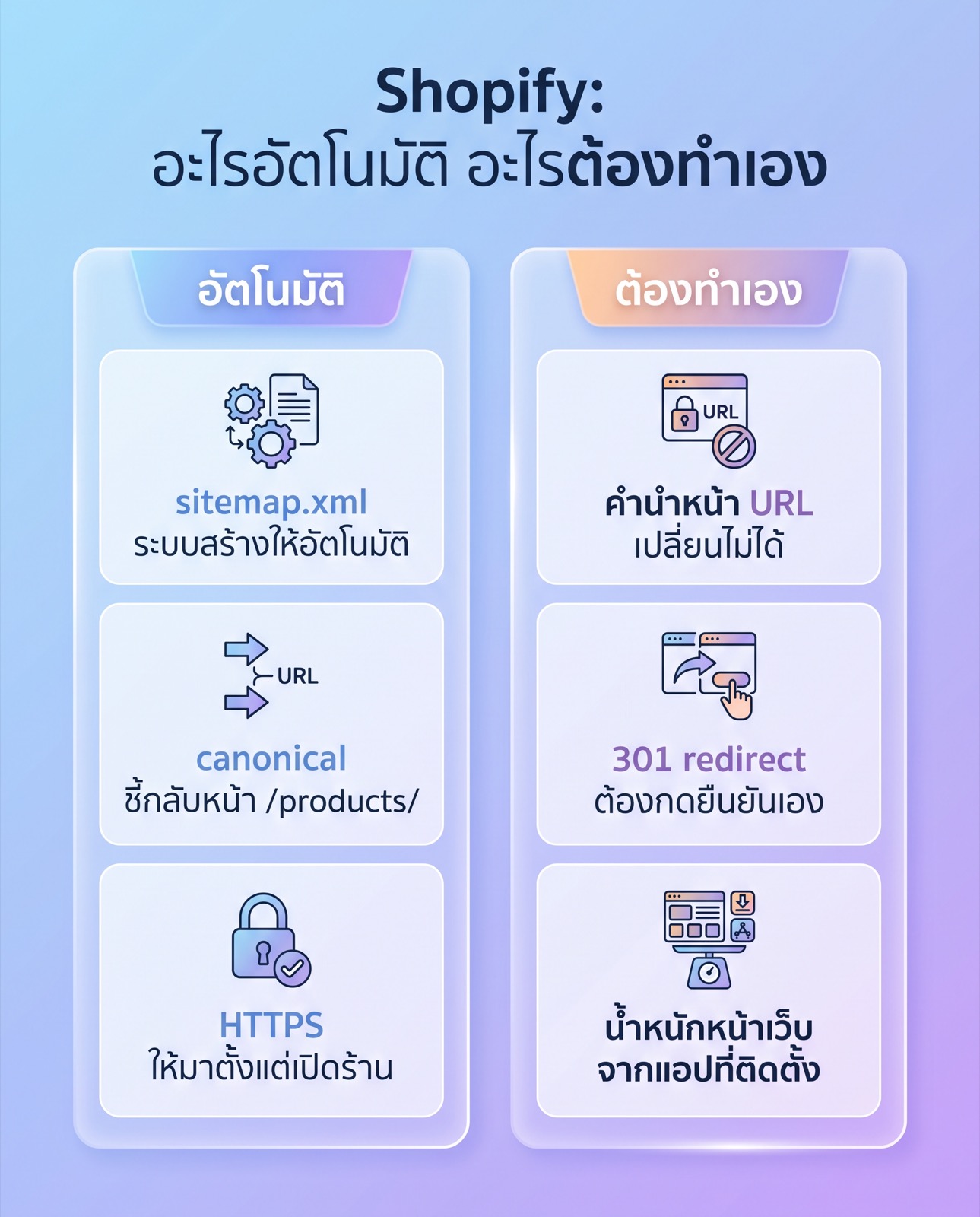
Every Shopify store gets an HTTPS certificate from the moment it opens, with nothing for you to configure. The themes Shopify ships are mobile responsive out of the box. The platform generates sitemap.xml automatically at the root of the domain, with child files for products, collections, pages and blog articles. And standard themes print a canonical tag into the head of every page for you. Those four items are exactly the four that custom-built ecommerce sites routinely get wrong or forget. Having the platform force them to be correct has real value.
Shopify also has a 301 redirect tool in the admin that works one row at a time or as a bulk file upload. When you change a product or page handle through the admin, the system offers to create a redirect from the old URL. That offer has to be accepted, it does not always happen by itself, so if someone on your team renames a product and skips the prompt, the old URL becomes a 404 immediately.
Where Shopify puts you on rails
The clearest constraint is the URL prefix. You cannot change it, not through any admin setting and not by editing the theme. Products live under /products/, collections under /collections/, content pages under /pages/, and articles under /blogs/ followed by a second segment for the blog name. If you want a URL like example.com/running-shoes, you will not get it on Shopify. You will get example.com/collections/running-shoes instead.
The second constraint is server-level control. You cannot set your own HTTP headers, you cannot read server logs, and you cannot write conditional redirect rules. All you can do is map a source URL to a destination URL, one row at a time. The third constraint is the sitemap file. You cannot hand-edit sitemap.xml. The system puts everything published into it. If you want a page out of the sitemap, you unpublish the page, you do not delete a line from a file.
The Shopify URL structure you cannot change
The part of the URL you set yourself is the handle, the text at the end after the prefix. The prefix belongs to the platform. When you plan site structure, treat yourself as designing handles and internal linking rather than a folder hierarchy, because Shopify does not give you a folder hierarchy to design. A collection cannot sit under another collection in the URL, no matter how your menu makes it look.
Why one product can sit at more than one URL
This is the Shopify trait that surprises new store owners most when they first look at a crawl report. A single product is reachable through at least two paths. The first is /products/product-handle, which is the main one. The second is a Shopify collection URL of the form /collections/collection-handle/products/product-handle, which is what a shopper gets when they click through from a collection page. If that product belongs to five collections, it can be reached through six paths that all serve the same content.
Shopify knows this, which is why standard themes print a canonical tag on the /collections/ version pointing back to /products/product-handle. That mechanism is why this is not a duplicate content problem in Google's eyes. So your job is not to close those paths off. Your job is to verify the canonical tag still works after your designers have edited the theme, because a heavily customized theme, or one where head code has been copied and pasted over, is exactly where that tag goes missing.
What you do control here is internal linking. When you link to a product from a blog article, a content page or a menu, link to /products/product-handle directly and never through a path with a collection in the middle. The canonical tag solves the indexing side, but internal links pointing at a non-primary URL still spend Googlebot's crawl budget on pages that are going to be consolidated anyway.
Pagination, filtering and sorting parameters
Collection pages generate another set of URLs you never asked for. Pagination produces URLs ending in a page-number parameter. Sorting produces a sort parameter. Product filters produce filter parameters that combine with each other in large numbers. A store with five filter types of four options each generates more combinations than it has products, several times over.
Shopify's default robots.txt blocks part of this group already, including internal search result pages and the cart. It does not block all of it. To find out whether this is a live problem for your store, open the index coverage report in Google Search Console and compare the number of URLs discovered against the number of products plus collections plus pages plus articles you actually have. If the first number is several times the second, Googlebot is spending its time on filter combinations.
Shopify SEO for beginners: a step by step diagnostic
The steps below are not a fix plan. They are an inspection order that tells you where your store is actually stuck before you pay anyone to change anything. Follow them in sequence, because each step rules out one group of causes.
- Open sitemap.xml at the root of your domain and walk through each child file. Count the products, collections, pages and articles listed. That number is how many pages you intend to have. Keep it as your baseline.
- Compare that baseline against Google Search Console in the report showing indexed and not-indexed pages. If discovered pages run far above your baseline, your problem is surplus URLs from filtering and sorting. If indexed pages run far below your baseline, your problem is content quality or internal linking, not the platform.
- Open one product page and view the source. Search the source for canonical and check that the value points at /products/product-handle. Then open the same product through its /collections/ path and check again. If both point at the same destination, the platform mechanism is intact.
- Turn JavaScript off in your browser and reload that same product page. What you still see is what Shopify rendered on the server. What disappears is what apps injected. If the product description, the reviews or important copy vanish, that is a risk you have to manage, and it is not a Shopify limitation. It is a consequence of the apps you installed.
- Count the requests and the weight of a single page load in your browser's network tab, and check whether the heaviest files come from Shopify's own domains or from somewhere else. If most of the weight is external, your speed problem is apps, not the theme.
After those five steps you can say which group your problem belongs to: a platform constraint you have to design around, or an ordinary SEO problem such as thin content, weak internal linking and nobody linking to you, which is the same problem set sites on every other platform have and the kind of thing a structured SEO audit lists out item by item.
How to improve SEO on Shopify: what you actually control
Once you know what cannot be changed, what is left is the list of what can, split by the layer you have to work in.
Layer one: per-page fields in the admin
Every product, collection, page and blog article has a section at the bottom of its edit screen for the information shown on a search results page. That is where you set the title, the description and the handle. The thing to check is the handle the system generated from your product title, because a long title or one with special characters produces a long unreadable handle. Changing a handle after the page has rankings has a cost, since you have to create a redirect every time, so fix it while the page is still new.
Image alt text is set from the admin too. For a store, alt text should say what is in the picture in a way a blind shopper understands, not stuff keywords in. Different angles of the same product should have different alt text, not the product name repeated on every shot.
Layer two: theme files
The head of every page is assembled in theme.liquid, which is where the title tag lives, where the canonical tag lives, and usually where JSON-LD structured data is placed. Modern themes built by Shopify tend to include some product structured data, but purchased themes and heavily edited themes follow no single standard, so you have to look for yourself. The fastest check is to view the source of a product page and search for application/ld+json.
The title tag pattern is set at this layer. Plenty of stores let the theme append the store name to every page title, which eats limited length for nothing on pages where the product name is already long. That decision is a theme edit, not a page-by-page edit. For a store that is rebuilding its theme anyway, settling this during Shopify web design work is far cheaper than retrofitting it later.
Layer three: the files the platform opens up
Since 2021, Shopify has let you edit robots.txt through a template file called robots.txt.liquid that you add to the theme. That is the only route for adding or removing rules in your store's robots.txt. The defaults Shopify ships are reasonable for an ordinary store, so editing this file is something you do when you can say why, with evidence from step two of the diagnostic behind it. A block in the wrong place here can take revenue pages out of search results on the next crawl.
The sitemap file is not in this group. You cannot edit it and you should not look for a workaround. Publication status per page is what controls sitemap content, not the file.
Shopify SEO plugin categories and the cost that is not on the pricing page
SEO apps on Shopify fall into five groups by the job they do, and each group deserves the same question before you install it: how long would this take by hand. The first group is bulk editing of titles and descriptions, worth it once you are past a few hundred products. With fifty products, one manual pass is faster and has no monthly fee. The second group is redirect management, which overlaps with the tool already in the Shopify admin. What those apps add is automatic 404 detection.
The third group injects JSON-LD structured data, and this one needs care, because if your theme already outputs structured data, installing an app on top gives one page two sets of product markup that can contradict each other. Check the source before installing. The fourth group compresses images, which does real measurable work. The fifth group crawls for broken links, which behaves like any general crawler and usually duplicates something you already run elsewhere.
The cost that is not on the pricing page is page weight. Almost every app injects its own script into your theme, and those scripts load on every page, not only the pages that use them. Most slow Shopify stores are not slow because of the theme. They are slow because they accumulated a dozen apps over two years, and some uninstalled apps left code behind in the theme. You check this by opening the network tab and counting requests to external domains. That count is the debt your apps left you.
The selection rule is simple: install an app when doing the job by hand costs more than the subscription, not because the app promises to do SEO for you. No app writes content people want to read and no app makes other sites link to you, and those two things decide rankings on competitive queries.
Shopify SEO tips that work within the platform's limits
When the URL prefix cannot change, weight shifts to collection pages. A Shopify collection page is your best candidate for ranking on category-level queries, yet standard themes render a collection as a grid of product images with no text at all. Adding a collection description that says who should buy what in this category and what the choices are is the fullest use of the space the platform gives you.
Second, the blog. Shopify forces articles to sit at /blogs/blog-name/article-handle, which makes the blog name a permanent part of every content URL. Many stores leave it at the default the system created and only realise later that the word is stuck in every URL. Decide the blog name before the first article, not after fifty.
Third, discontinued products. Online stores accumulate dead products constantly, and deleting them creates 404s on pages that had links pointing in. Your options are to keep the page and say the item is unavailable while offering alternatives, or redirect to the closest matching collection. What you should not do is redirect everything to the homepage, because Google generally treats an irrelevant redirect as a not-found page anyway.
Fourth, products with many variants such as colour and size. Shopify gives each variant its own URL parameter. If your variants differ only by colour, keeping them on one page is the right answer. If shoppers genuinely search for the models separately, splitting them into separate products gives each one a page with genuinely different content. That principle applies to every ecommerce platform and belongs to ecommerce SEO rather than to Shopify specifically.
What the platform handles and what you handle
The table below sorts the technical elements of a Shopify store by who is responsible for each. Use it to decide what belongs on your work plan and what you can stop thinking about.
| Element | Shopify handles it | You handle it |
|---|---|---|
| sitemap.xml | Generated and updated automatically at the domain root | Control its contents through each page's publication status |
| Canonical tags | Standard themes print one per page and point the /collections/ version back to /products/ | Verify the tag survives theme edits, and link internally to /products/ directly |
| URL prefixes | Fixed by the platform and not changeable | Set readable handles before the page earns rankings |
| robots.txt | Ships with defaults that block internal search and the cart | Edit via robots.txt.liquid only when evidence says you must |
| Page speed | Hosting and content delivery network are provided | Limit script-injecting apps and clean up code old apps left behind |
What this means for a Thai store
First, Thai product titles and handles. When you name a product in Thai, the system generates a handle for you. Create one test product and look at the result before you build out the whole catalogue, then decide from what you actually see whether to keep Thai handles or write them in roman characters. Both work. A Thai URL becomes a long encoded string when it is copied and pasted elsewhere, while a roman handle reads more cleanly when shared in chat but gives up the exact keyword match in the URL. There is no single right answer for every store. The clearly wrong move is changing your mind after five hundred products exist.
Second, running two languages. If you sell to Thai and foreign customers, you choose between Shopify's own multi-language setup inside one store or two separate stores. The first has the platform handle the declaration of alternate language versions to a degree. The second gives you more control but you maintain the connection between the two stores yourself, along with two sets of inventory. Before deciding, check what share of your orders actually come from abroad using your own order data rather than an assumption.
Third, and this changes the thinking most. Many Thai shoppers reach a store through social media links and marketplace listings rather than primarily through Google search. The real proportion varies by product category and there is no reliable public figure worth quoting. The only way to answer it is to open your own traffic source report and see what share of sessions organic search accounts for. If that number is very low, the next budget may belong to page speed and conversion rate before it belongs to rankings, because social traffic lands on these same pages already.
Fourth, the pages Thai shoppers look for before they buy: payment methods, shipping cost, delivery time and return conditions. These sit under /pages/ and are usually written as an afterthought even though they are the most-read pages after product pages. Writing them fully and plainly helps the person deciding to buy and gives the store content that answers real questions, which connects to ecommerce marketing more broadly than to SEO alone.
Shopify SEO FAQ
Is Shopify actually good for SEO?
It is good at the technical basics and restrictive about URL structure. The platform gives you HTTPS, mobile-ready themes, an automatic sitemap and canonical tags from day one, and it refuses to let you change URL prefixes, set your own HTTP headers or hand-edit the sitemap. Most stores lose to competitors on content and links rather than on those two constraints.
Do I need to remove collections from my URLs?
You cannot, and you should not spend time trying. Shopify URL structure prefixes are fixed at the platform level and no setting or app genuinely changes them. Your competitors on Shopify live under the same rule, so what separates you is the content on your collection pages and the links pointing at them.
Is the same product at several URLs duplicate content?
Normally no, because standard Shopify themes print a canonical tag on the /collections/ version pointing back to /products/. What you have to check is that the tag survived your theme customization and that your internal links point at /products/ directly instead of going through a collection path.
How many SEO apps should I install?
Only as many as cover jobs that are not worth doing by hand. Each app injects a script into your theme and loads on every page, adding weight. A store with a few dozen products usually needs no bulk editing app at all. Before installing a structured data app, view a product page source and check whether the theme already supplies it.
Where do I start with a brand new store?
Start with the five-step diagnostic in this article so you know whether your problem is a platform constraint or an ordinary SEO problem. Acting before you know what is broken spends budget on something that is not the bottleneck.
Closing
Shopify hands you correct technical foundations and locks URL structure and server-level control away from you. Your job is to know where the line falls and put your hours on the side you control: readable handles, collection descriptions with real content, internal links pointing straight at the primary product page, and an app count that does not creep.
This article deliberately stops at the diagnosis. The ordered implementation checklist for a Thai-language store, from Thai handles through alternate language declarations to handing a product feed to Google, is a separate piece of work that has to be planned on its own, because every item on that checklist depends on what your diagnosis just found. If you want someone to look at where your store is stuck and what to do first, the Shopify SEO service page explains the approach, and the conversation starts with what the numbers in your own reports are saying right now.