
TL;DR
- The order of Shopify SEO work matters more than the tool list: baseline in Search Console and redirect discipline come before any rewriting.
- A 25-step checklist across seven areas: technical, on-page, product pages, collection pages, content, structured data, and speed.
- Thai stores have four extra decisions: Thai or Latin handles, keyword work in a language written without spaces, hreflang for bilingual stores, and one catalogue feeding both the storefront and the shopping feed.
- Shopify SEO pricing has no single number. It is set by catalogue size, theme work, bilingual scope, how much content is written, and whether the work is a one-off audit or ongoing.
- Hiring makes sense past roughly a hundred SKUs, in a competitive category, on a fixed timeline, for theme-level work, or for a bilingual build.
The store is live, every SKU is loaded, and search traffic is barely moving while sales sit flat. The first question most owners ask is which app to install, when the question that actually matters is what to do first and what to do after that. Most wasted shopify seo work is not wrong work. It is right work done in the wrong order. Rename product handles across the catalogue before setting up redirects and every old link dies at once. Rewrite product copy before checking which pages are indexed and half the writing lands on pages Google never collected.
This article is the execution plan, not the explainer. If you still need the underlying account of how Shopify handles URL structure, products reachable through more than one path, and duplication, that ground is covered separately. What follows is the order of work: a 25-step checklist arranged the way it should actually be executed, then the Thai-market specifics, then the decision about doing it yourself or hiring.
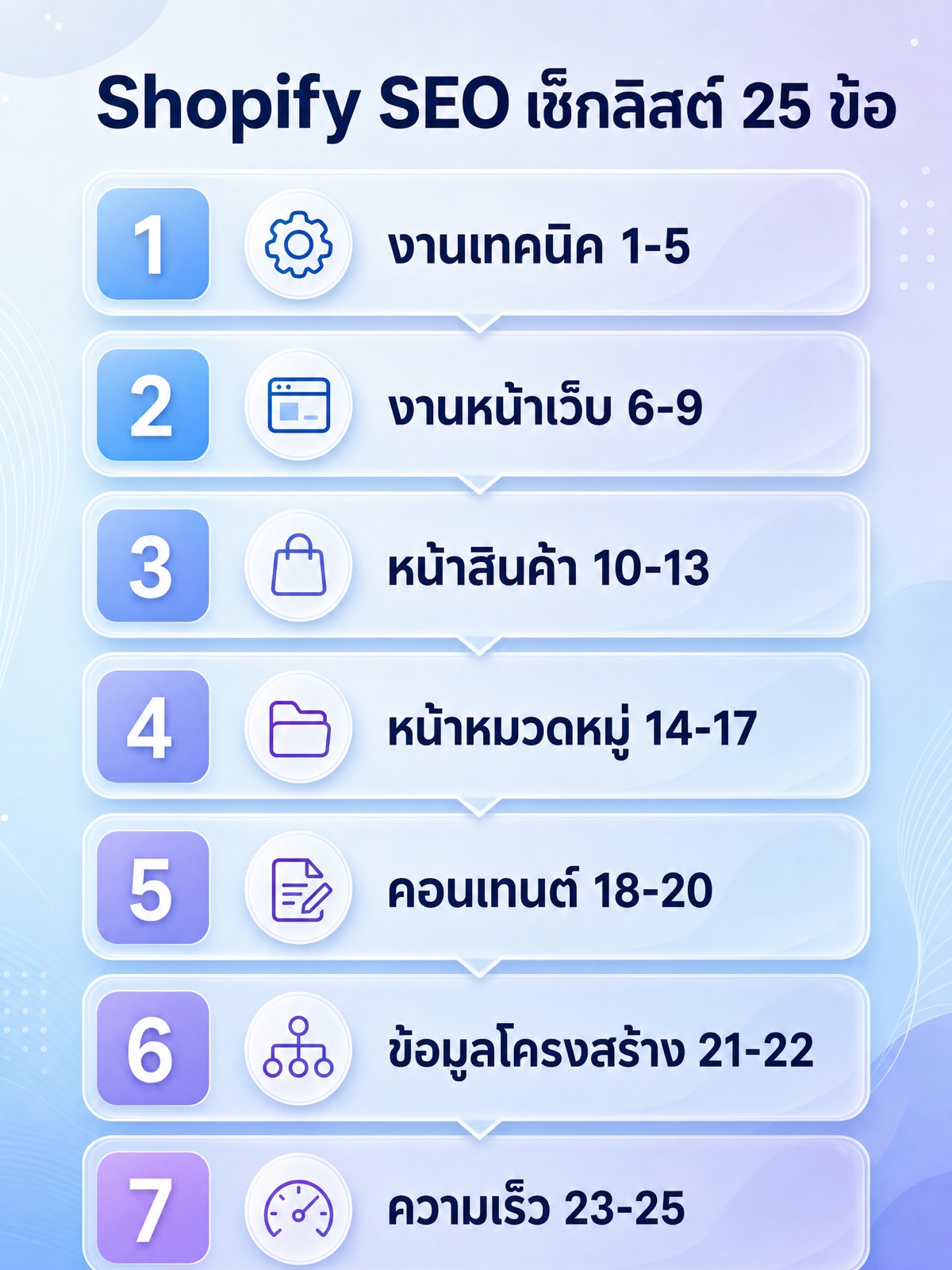
Technical: steps 1 to 5
The first five steps set your measurement baseline and prevent damage. Skip this section and none of the page work that follows can be evaluated, while some of the edits will quietly break existing links until sales drop.
- Verify the store in Google Search Console and submit the sitemap. Shopify generates sitemap.xml automatically and updates it when you add or remove products. Your job is to submit that file and open the indexing report to see which pages are indexed and which are discovered but not indexed. Those two counts are your baseline. Without a baseline, every later argument about whether something worked becomes guesswork.
- Confirm the store is actually reachable and that test versions are not leaking. A store still behind the storefront password is not crawled at all. Then check that development themes, preview links, and any secondary domain you attached are not serving the same catalogue in parallel with your main domain. Shopify ships a robots.txt.liquid file with sensible defaults, so read what is already in it before adding rules on top.
- Decide the indexing rules for filtered, tag, and sorted URLs. A store with several hundred products generates a large number of URLs in the form /collections/name/tag plus URLs carrying sort parameters. Pick the small set of filter combinations people genuinely search, such as a colour, a size, or a brand that gets typed often, and let those be indexed. Block the rest. Leaving everything open means crawlers spend their time on pages that will never rank instead of the pages that sell.
- Check the canonical tag on products reached through a collection path. By default Shopify points the canonical of a product reached through a collection back to that product's main URL. The failure happens when a theme has been edited by hand, or a new product template was created and that piece of code went missing. Open the source of three real product pages from different templates and read the canonical with your own eyes. Do not assume it is correct because it is the default.
- Establish redirect discipline before you touch anything that is part of a URL. Changing a product or collection handle changes the URL, and every existing link becomes a 404 immediately. Shopify has a URL Redirects tool in the online store section. Make it a rule that any product deletion, any merge of two products, and any handle change creates a 301 redirect to the closest equivalent page in the same working session, not as cleanup later.
On-page basics: steps 6 to 9
This section covers the titles and descriptions that appear in search results. For a store with a large catalogue the key point is to stop writing them one at a time. Set a pattern that scales first, then hand-write only the pages that matter most.
- Design a title tag pattern for each template type. Product pages, collection pages, blog posts, and standard pages each deserve their own formula. A product might use product name plus the attribute people search plus store name, while a collection uses category name plus a commercial modifier plus store name. Decide once whether the brand goes at the front or the end, then apply that everywhere. Switching between the two makes your search results look like they belong to different stores.
- Sweep for duplicate and truncated titles. Export the product list and sort the title column to find repeats. Products that differ only by colour or size routinely end up with byte-identical titles, which leaves Google to guess which one to show. Add the differentiator people actually search on rather than your internal product code.
- Write meta descriptions by pattern, then hand-write the pages that make money. Meta descriptions are not a direct ranking factor, but they are the text that decides whether someone clicks. Apply a shared formula across the catalogue, then take the twenty to thirty highest-revenue pages and write those individually, including the things that decide a purchase such as available sizes, shipping conditions, or warranty terms.
- Check the heading structure in each template. A page should carry one top-level heading, and on a product page it should be the product name. Some themes wrap the store logo or a promotional banner in the top-level heading on every page, which means every page in the store announces the same heading. Open the heading structure of one product page, one collection page, and the homepage and confirm it.
Product pages: steps 10 to 13
Product pages are the most numerous and the most neglected, because there are too many of them to handle by hand. The answer is not to complete all of them. It is to decide which ones get manual work first.
- Rewrite product descriptions, starting with the best sellers. Supplier-supplied copy is the same block of text that dozens of other stores are also publishing. A page whose text appears identically across the internet gives no reason to be the one selected. Work down a product list sorted by sales, not alphabetically, and stop at the point where the labour stops being worth that product's revenue.
- Add the specifications buyers actually search for, as a list. Size, material, compatibility with other models, care instructions, weight, and warranty terms are the words people type after a product name. Burying them in a long paragraph hides them from readers and from machines alike. Put them in bullet points that can be read in a single glance.
- Name image files and write alt text before uploading. Shopify keeps the filename you upload inside the image URL on its CDN, so renaming a file afterwards means re-uploading it. Rename the file on your machine first, turning a camera serial number into something that says what the image shows, and then upload. For alt text, describe what is genuinely in the image rather than repeating a keyword.
- Handle variant-level URLs. When a shopper picks a colour or size, Shopify appends a variant parameter to the URL. Confirm those are not being counted as separate pages in the indexing report, and confirm the variant shown by default is the one you want appearing in search results, because that is the price and the image people see first.
Collection pages: steps 14 to 17
Collection pages are the best receivers of commercial search queries in an online store, because someone typing a product category wants to see several options rather than a single item. Yet in most Shopify stores the collection page contains almost no text beyond a grid of product images.
- Name collections the way customers search, not the way the store talks internally. Nobody searches for "new collection" or "series B". Name them after the product category in plain words, and set the handle deliberately the first time, because changing it later always drags a redirect along with it as covered in step 5.
- Write collection intro copy that answers a pre-purchase question. Put a short passage above the product grid explaining what the collection covers, and put the longer passage below the grid so buyers are not scrolling past prose to reach products. The questions worth answering are how to choose, how the options differ, and who each one suits.
- Build internal links from collections to sub-collections and hero products. Shopify's navigation gives every page the same set of links, which says almost nothing about relative importance. Add links inside the collection's body copy pointing at related sub-collections and the few products you want to push, using anchor text that names the destination.
- Clean up empty and nearly empty collections. A collection holding one product or none is a blank page waiting to be crawled. Choose one of two options: fill it until it is a real collection, or keep it out of the index and remove it from navigation. Leaving it in place dilutes your own store.
Content: steps 18 to 20
Content in an online store does not automatically mean blogging. The highest-return work is matching queries to the right page type before writing anything new.
- Map queries to page types before writing. Category-level queries belong on collection pages, model-specific queries belong on product pages, and question or how-to queries are the ones that belong in articles. Many stores write blog posts chasing queries whose search results are filled entirely with collection pages, which is a losing effort before it starts. Open the actual results for that query and see which page type dominates.
- Make articles link back into collections and products. An article with no outbound link to a page that sells something is traffic that ends where it lands. Place links inside the body text with anchor text that names the destination, positioned at the moment the reader has just got their answer rather than stacked at the end.
- Merge or delete thin, overlapping articles. If four posts answer the same question with slightly different wording, they compete with each other and none of them is strong. Consolidate into the best one and redirect the rest to it.
Structured data: steps 21 to 22
Structured data is what gives price, availability, and navigation paths a chance to appear in search results. Before installing another app, find out how much of it your theme already produces.
- Check the product structured data your theme already outputs before installing an app. Many current themes already include product markup. Installing an app on top without checking leaves one page carrying two sets of the same data that can contradict each other. Run a product URL through Google's rich results testing tool, read what comes back, and only then decide what is missing.
- Add breadcrumbs, both the visible trail and the structured data. Breadcrumbs help visitors who arrive straight from a search result and help search engines understand the store's hierarchy. Add the visible trail on product and collection templates plus structured data that matches it. The two have to agree rather than describe different paths.
Speed: steps 23 to 25
Most Shopify speed problems do not come from the platform, since hosting is handled for you. They come from what gets added afterwards: apps and the code they leave in the theme.
- Audit installed apps and the leftovers from uninstalled ones. Many apps embed a script in your theme files at install time, and removing the app does not always remove the script. Open theme.liquid and read the externally loaded scripts line by line. Anything you cannot trace back to an app you still use is the first candidate for removal, with a theme backup taken first.
- Upload images at the size you actually display them. Product images uploaded straight from a camera are usually several times larger than the space they render into. Resize before upload, and in the theme request the width you need through Shopify's image filters so the platform serves an appropriately sized file, with lazy loading enabled for anything below the first screen.
- Measure on mobile with real user data, and measure again after every app install. Lab numbers from a desktop machine on a fast home connection say nothing about a buyer opening your store on a phone while out. Use the real-user data reported in Google's tooling, and make it a rule that any new app install is followed by a re-measurement within the same week.
What is specific to a Thai store
The four issues below are the ones a translated checklist never covers, and each of them changes how the work is actually done in Thailand.
Thai handles or Latin ones
Shopify accepts Thai characters in product and collection handles, and browsers and search engines handle the encoded URLs normally. The advantage of a Thai handle is that a reader knows immediately what the page is. The drawback is that when it gets copied into a chat message or an email it becomes a long string of percent signs, which looks unclickable and breaks badly when a line wraps. For a store that shares links mainly through chat, transliterated Latin or a direct English word is the safer choice, with the Thai wording carried in the page title and body instead. The worst option is mixing both within one store. Pick one convention and hold it, because changing your mind later means a redirect for every page.
Thai has no spaces between words, and that changes keyword work
Thai is written without spaces between words, so search systems have to segment it themselves. Two practical consequences follow. First, stacking keywords in a title reads far worse in Thai than in English, because there are no spaces to help the eye separate them, so a good Thai title is a phrase someone would actually say rather than a pile of keywords. Second, keyword tools that report search volume frequently split Thai phrases into groupings that do not match what people type. Treat tool numbers as direction only and confirm them against real query data from your own Search Console plus the terms customers type into your on-site search. Those two sources are your store's own data rather than an outside estimate.
A bilingual store must not compete with itself
Plenty of Thai stores sell to both local and foreign customers. The problem starts when the Thai and English versions of the same product compete in the same set of results. What you need is a clear declaration of the relationship between the two versions using hreflang tags, where every page points to its counterpart in the other language and back to itself. If you use Shopify's built-in multi-language system, confirm your theme genuinely outputs those tags by opening the source of a product page in both languages and comparing. Do not assume it works because the on-screen language switcher works. Those are separate layers. If you are building a bilingual store from scratch, this belongs in the Shopify site structure decisions rather than in a later fix.
The product feed and your organic data come from one catalogue
If the store also runs shopping ads, the feed sent to Merchant Center pulls product names, descriptions, images, prices, and stock status from the same catalogue your storefront uses. A badly written product name therefore costs you twice: it fails to rank organically and it matches ad queries poorly. The reverse is also true, so putting the words customers search into product names pays in both directions at once. The thing to watch for is disagreement, such as a price on the page that differs from the price in the feed, or stock status that has not refreshed, which gets the item rejected on the ads side and makes the structured data on the page wrong at the same time. If you already run Google Shopping campaigns, treat the catalogue as the single source and stop maintaining two versions of the truth.
Doing it yourself against hiring an agency
The table below compares the two options across the four axes that actually decide it: time, real cost, the result you can realistically expect, and the risk. There are no price figures in it, because price depends on scope, which is explained in the section after next.
| Axis | Doing it yourself | Hiring an agency |
|---|---|---|
| Time | You can start the same day, but the work moves at the speed of whatever time is left over from selling, so a 25-step checklist usually stretches across months. | There is a start-up period for access and product understanding, after which the work runs to a plan with someone accountable for it full time. |
| Real cost | No fee, but paid for with the owner's hours, which are the same hours that go into products and customers. | A visible line item, exchanged for the owner's time back and for speed of execution. |
| Realistic result | All the fundamentals are genuinely doable in house, especially steps 1 through 9. The work that has to be repeated across hundreds of pages tends to stall halfway. | Both the high-repetition work and theme-level work are in reach, including anything requiring a crawler across the whole store. |
| Risk | The main risks are changing URLs without redirects and editing theme code without a backup, both of which are hard to undo. | The main risks are a good-looking report with no actual change on the site, and dependency to the point that nobody in the store understands what was changed. |
| Best fit | Stores with a modest catalogue, simple category structure, and an owner with consistent weekly time. | Stores with a fast-growing catalogue, a genuinely competitive category, or a bilingual build. |
When hiring is the right call
These are conditions rather than an invitation. If none of them describe your store, working through the order above yourself is the cheapest correct answer.
- A catalogue past roughly a hundred SKUs. The point where per-page work stops being feasible by hand is the point where you have to start working from exports, template-level rules, and a site-wide crawler, which is a different skill from editing one page at a time in the admin.
- A category where competitors are genuinely investing. If the results for the terms you want are filled with large retailers and marketplaces, fundamentals alone will not close the gap, and you need someone who can read a results page and tell you which terms to abandon.
- A need to scale inside a fixed window. A category launch or a defined selling season will not wait for twenty-five steps spread across several months.
- Theme-level work you are not willing to break. Fixing heading structure, adding breadcrumbs, or stripping leftover scripts from old apps all touch files that take the storefront down when they go wrong.
- A bilingual or cross-border store. Setting up hreflang, separating the language structures, and keeping the two versions from competing are the kind of mistakes that show up slowly and are hard to detect.
How to choose a Shopify SEO agency
The question to ask is not whether they have worked on a store like yours. It is the set of questions whose answers you can verify. Here is what to ask for and what a good answer looks like.
- Ask them to describe the order of work in the first thirty days. A good answer starts with assessing the current state and establishing measurement, not with writing content. If a proposal opens with a number of articles per month before anyone knows which pages are indexed, that is production capacity being sold rather than diagnosis.
- Ask for examples of work that show changes on real pages, not graphs. Ask what was changed at page level and at theme level, and have them explain why that came before something else. The evidence worth requesting is an auditable list of changes plus measurement drawn from your own Search Console and GA4 accounts.
- Confirm every account is in your name. Search Console, GA4, Merchant Center, and the Shopify admin belong to the store, with the agency granted access to work in them, rather than the agency owning the accounts and showing you their reports. If ending the engagement would take the historical data with it, that is a reason to decline at the outset.
- Ask how they will edit the theme. A good answer duplicates the theme, tests on the unpublished copy, publishes afterwards, and keeps a record of what changed. The answer to be wary of is edits made directly on the live theme with no copy.
- Be wary of ranking guarantees. Nobody controls Google's results, so a guarantee of a first position within a set number of days is a promise the promiser has no power to keep. What can genuinely be guaranteed is scope, the number of pages to be changed, and the reporting cycle.
- Be wary of work that cannot be explained. If asking why something needs changing produces terminology unconnected to any specific page in your store, keep asking until the answer names the page and the reason.
How to ask about price
There is no single number that answers what Shopify SEO costs, because price is set by scope rather than by the name of the service. Five variables drive most of the difference. First, the number of products and collections, since per-page work multiplies directly by page count. Second, whether the theme has to be touched, because code work is priced differently from admin-panel edits. Third, whether the store is bilingual, which nearly doubles the content side. Fourth, how much content has to be written from scratch, since rewriting descriptions across a catalogue is a different job from tightening existing ones. Fifth, whether this is a one-off audit or ongoing monthly work. When you request a quote, ask for it broken into line items with page counts and monthly hours rather than a single figure labelled SEO services, and ask specifically what is excluded. Starting with a standalone SEO audit before committing to a long contract is how both sides learn the real scope before a price is agreed.
FAQ
How long does Shopify SEO take to show results?
There is no standard timeframe that applies to every store, and anyone quoting a firm number is guessing. What can be described is the order in which signals appear. Technical work such as fixing indexing and redirects shows up first in Search Console reporting, because it is measured from what crawlers can collect. Content and collection work takes longer, since pages have to be recrawled and reassessed. The workable approach is to watch intermediate indicators, such as the number of indexed pages, the number of queries a given page appears for, and the average position of the term group you are targeting, rather than waiting on sales alone.
Is installing an SEO app enough?
No, because apps handle repetitive systematic work well but cannot make decisions for you. What an app genuinely helps with is applying a title pattern across the store, finding broken links, and filling in structured data the theme does not output. What it cannot do is decide which collections should exist, write product copy that differs from the supplier's, or judge which filter pages deserve to be indexed. On top of that, apps that inject code into the theme carry a hidden speed cost. Treat an app as a tool inside the plan, not as the plan.
Do you need to leave Shopify to do SEO properly?
In most cases no. The Shopify limitation people mention most often is the URL structure you cannot fully change, which is a real constraint but almost never the reason one store loses to another. Far more common causes are collection pages with no content, copied product descriptions, and a store slowed down by accumulated apps. Migrating platforms is a large project carrying real risk of losing traffic along the way, so it should be considered for other business reasons, such as back-office requirements, rather than on SEO grounds alone.
What does Shopify SEO cost?
It depends on five aspects of scope: the number of products and collections, whether theme work is required, whether the store is bilingual, how much content has to be written from scratch, and whether the work is a one-off audit or ongoing. A store with a few dozen products on a standard theme selling in one language sits at a different level from one with several thousand products in two languages. The fair way to compare quotes is to ask each provider to break the work into the same line items, meaning pages to be changed, content pieces to be written, technical hours per month, and reporting cycle, then compare on that list rather than on the final figure alone.
Should a Thai store write product pages in Thai or English?
Write in the language your customers search in, which for a store selling mainly domestically is Thai. The common exception is model names, brand names, and technical terms that Thai shoppers already type in Latin script, and those should be kept as people actually type them. If you sell to both local and foreign customers, the correct approach is two versions declaring their relationship through hreflang, not one page mixing both languages, since a mixed page is unclear to readers and search engines alike. To check whether you guessed right, read the real query report in Search Console and see which language people arrive with.
Where to start
If you have read this far and still are not sure where to begin, finish steps 1 through 5 inside the first week. That section is what makes everything afterwards measurable and stops you breaking what already works. Then work down the order, pausing to review at the end of each group. A store that completes all twenty-five steps slowly does better than one that repeats the first ten every quarter.
When per-page work outgrows what the in-house team can carry, or you want someone to check what has already been done before more effort goes in, look at what a Shopify SEO engagement actually covers and see which scope matches your store. If you sell across several channels at once, taking the wider view of ecommerce SEO early saves rebuilding the same structure twice.