Traffic is down. Impressions look strange. The search results page doesn't resemble the one your strategy was built for anymore. If you've checked your campaign dashboards lately and felt a small knot in your stomach, you're not alone. AI hasn't just changed search behavior, it's redrawn the entire map that Google Ads campaigns depend on.
For years, marketers built strategy on a simple idea: rank high, get clicks, drive conversions. That formula worked because the search results page was predictable. Now generative search and AI Overviews have inserted themselves right in the middle of that process, and the old assumptions about position, clicks, and value are breaking down fast.
This post isn't another rundown of new AI features. It's a practical framework for business professionals who need to protect ad spend, understand what's actually happening on the page, and rebuild campaign structure around how people search today.
- The New Anatomy of the SERP
- Rebuilding Campaign Architecture for an Intent-Layered Ecosystem
- Steering AI, Measuring Impact, and Protecting Budget
The New Anatomy of the SERP
The search results page used to have a simple shape: ads at the top, organic links below, maybe a map pack or shopping carousel mixed in. AI Overviews blew that shape apart, and understanding the new layout is the first step to fixing your strategy.
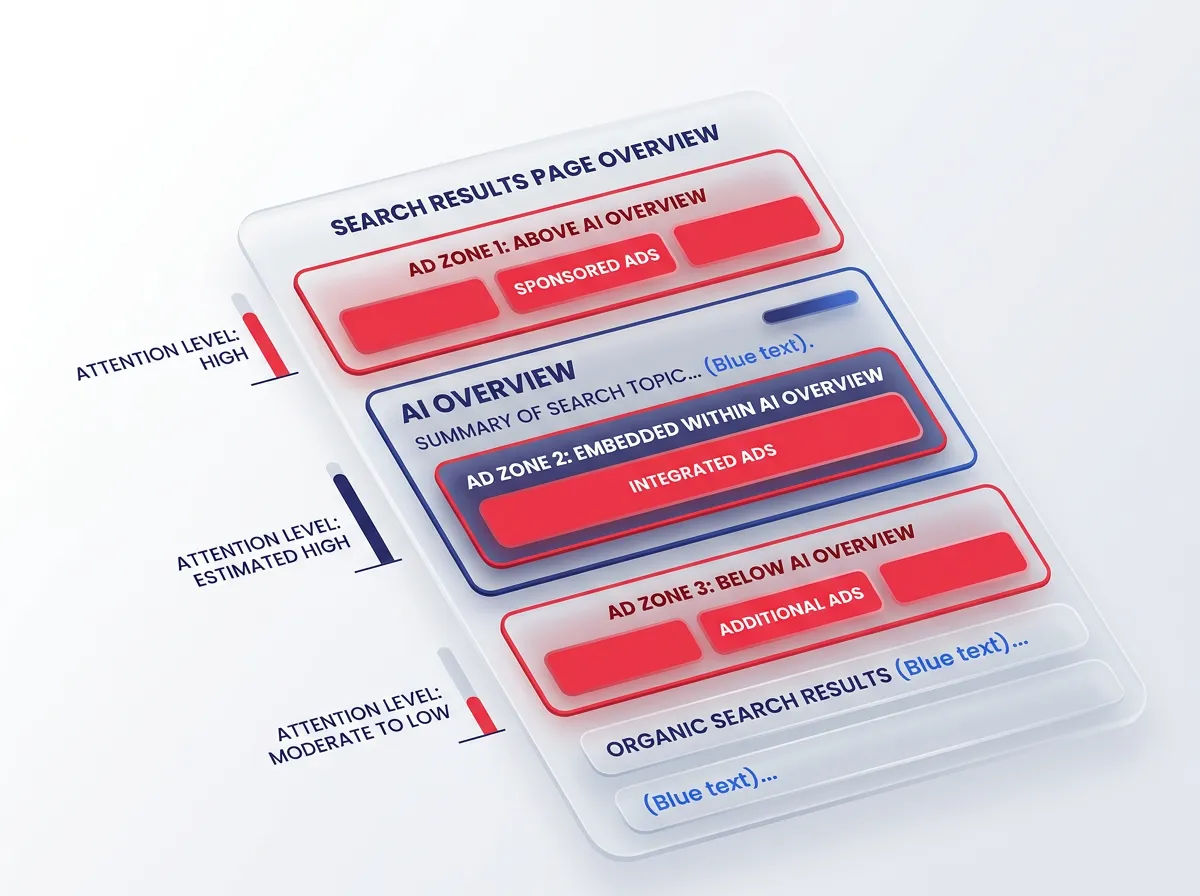
3 Paid Ad Environments: Above, Embedded, and Below the Summary
Google Ads now show up in three distinct zones relative to the AI-generated summary, and each one behaves differently.
1. Above the Summary
These are the traditional top-of-page ads that appear before any AI content loads. They still get strong attention because users see them first, but for many query types, fewer people are actually reaching this zone before bouncing.
2. Embedded within the Summary.
Google has started weaving ads directly into AI Overviews for certain commercial queries. These placements borrow credibility from the surrounding AI content, and early data suggests users trust them differently than a standard text ad.
3. Below the Summary.
This is the zone that worries advertisers most. Ads here sit underneath a large block of AI-generated text, pushed further down the page than they used to be.
Each zone has a different attention profile and a different conversion rate. Treating them as one undifferentiated "ad position" in your reporting is a mistake. A click from above the summary and a click from below it might represent two completely different buyer mindsets.
The Zero-Click Reality and the Value of Visibility-Only Assets
Here's the uncomfortable truth: a large share of informational searches no longer produce a click at all. The AI Overview answers the question directly, and the user moves on immediately. This is called the "zero-click search," and it's the new normal for a big chunk of query volume.
This changes how you should think about informational keywords. If someone searches "what is the best fabric for outdoor furniture," they may never click your ad. But if your brand name shows up in that AI Overview, or your ad appears alongside it, you've still earned something: visibility. That visibility builds recognition, and recognition later leads to branded search or direct traffic to your brand's website.
The practical shift here is in how you calculate ROI. Instead of judging an informational campaign purely on click-through rate, start tracking impression share and brand lift for these terms. They're doing a job, just not the job they used to do. I'd treat budget allocated to pure informational queries as a visibility investment, not a direct response line item.
Scroll Depth Psychology: Why Position Below an AI Overview Is Not Page Two
There's a myth going around that an ad below an AI Overview is basically buried, the digital equivalent of page two of Google. That's not accurate, and it matters for how you set expectations internally.
When a user scrolls past an AI Overview, they're usually doing one of two things:
1. Looking for confirmation of what the summary just told them
2. Looking for a source they trust more than a generated paragraph
That's fundamentally different from the old page-two scroll, which meant a user was dissatisfied with everything on page one and kept digging.
A position below the summary still gets what we'd call a "second look." Here's why that matters:
- The user has already been primed with the topic, so they arrive at your ad with more context and often more intent.
- Click-through rates probably won't match the old top spot.
- But the value per click can actually be higher, because the user has already self-qualified through the AI content above.
Search behavior around this zone is still settling, and every account looks a little different depending on industry and query type. But the takeaway holds across the board: don't write off below-the-summary placements as dead space. Measure them separately and give them a fair chance to prove their worth.
Rebuilding Campaign Architecture for an Intent-Layered Ecosystem
Once you accept that the page itself has changed shape, the next step is rebuilding your campaigns to match. Keyword-first thinking, where every term gets treated the same way regardless of what the searcher actually wants, doesn't hold up in an AI-summarized environment anymore.
From Keyword-First to Intent-First: Informational, Commercial, and Transactional Layers
The old model organized campaigns around keyword themes. The new model needs to organize around intent layers first, with keywords nested inside them.
Think of three layers:
- Informational layer: broad questions, definitions, comparisons. These are the terms most likely to get swallowed by an AI Overview with zero click.
- Commercial layer: queries where the person is comparing options, reading reviews, or narrowing down a shortlist. Some AI summarization happens here too, but click intent is still present.
- Transactional layer: queries with clear buying signals, like "buy," "price," "near me," or a specific product name. These terms are the least disrupted by AI Overviews and still convert at strong rates.
Once you segment this way, you can make smarter budget decisions. Informational terms get lighter spend and different KPIs, focused on impression share and assisted conversions. Commercial terms get moderate spend with creative built to stand out next to AI content. Transactional terms keep getting the bulk of your budget, because that's still where the reliable revenue lives.
This restructuring also stops you from wasting budget competing head-on with AI Overviews on purely informational terms where you were never going to get the click anyway.
Auditing Queries: Curiosity Questions vs. Continuation Questions
Not every question-based query behaves the same way, and this is where a lot of account audits go wrong. You need to split questions into two buckets.
Curiosity questions are asked out of general interest. Something like "why do dogs howl at sirens." The person wants an answer, not a purchase, and they'll almost never click through to a landing page no matter how good your ad is. Bidding hard on these terms is often a waste of spend.
Continuation questions sound similar on the surface but carry buying intent underneath. Something like "why does my HVAC unit make a clicking noise" often leads to a follow-up action, like booking a repair. Even after the AI Overview answers the surface question, the person still wants a real solution, so they keep going.
Run a query report and manually tag your top informational search terms into these two buckets. Pause or heavily reduce bids on pure curiosity terms. Keep, and even increase investment in, continuation terms, because these are the ones quietly driving conversions even though they look like simple questions on paper.
This kind of manual query auditing takes time, but it's one of the highest-leverage exercises you can do right now. Search behavior has gotten more nuanced, and your query audits need to catch up.
Why Structured Creative Assets Now Drive Ad Performance
When an AI Overview takes up a large chunk of the page, your ad has less room and less time to make an impression. That's why structured creative assets have become the real performance lever, more than headline copy alone.
Images, price extensions, callout extensions, and product feed data all give your ad more visual weight and more information packed into a smaller space. An ad with a clear price, a strong callout, and a relevant image can hold its own next to a wall of AI-generated text, while a plain text ad tends to get lost.
If you run Search or Shopping campaigns, it's worth reviewing your settings inside the AI Max for Search campaign settings in Google Ads, since Google has been expanding how automated systems use your assets to build ad combinations dynamically. Feeding the system strong, complete asset sets gives it better raw material to work with, which matters more now than it did a year or two ago.
Practical checklist for asset strength:
- Add at least three to five callout extensions per ad group
- Keep price extensions current and accurate
- Use high-quality product images wherever the format allows
- Fill in structured snippets with specific, relevant values
- Refresh sitelinks quarterly so they reflect current offers
Google Ads performance in this new environment rewards completeness. The advertisers with the fullest, most accurate asset libraries are the ones holding steady while others see erratic swings.
Steering AI, Measuring Impact, and Protecting Budget
Automation isn't going away, and fighting it head-on isn't a winning strategy. The better approach is learning where to let automated systems run and where to keep a firm hand on the wheel.
Balancing Automated Bidding with Manual Steering Controls
Smart Bidding and broad match are useful for surfacing new demand, but they need tighter oversight than before.
Negative keywords are your first line of defense. Review search term reports weekly, not monthly; query patterns shift fast now. Cut curiosity-driven, no-intent terms quickly before they burn budget.
Pinning is underused. If a headline or asset performs well in a specific position, pin it, especially above the summary, where direct headlines beat exploratory ones.
Rule of thumb: let Smart Bidding chase conversion value on transactional and commercial terms, but keep manual controls, lower budget caps, and strict negatives on informational terms. This lets automation find new demand while protecting spend where AI Overviews have already eaten the clicks.
Review cadence matters too. Monthly used to be fine; biweekly is now the realistic pace, given how fast AI Overviews are expanding.
Using Schema and Structured Data to Improve Ad Relevance
SEO and paid search used to live in separate departments with separate goals. That separation is becoming a liability. AI systems, whether it's Google's own summarization engine or a chatbot pulling from the web, rely heavily on structured data to figure out what a page is actually about.
When your site has clean schema markup, product data, FAQ structure, and organization details, you're not just helping organic rankings. You're also giving the broader AI ecosystem clearer signals about your business, which can influence how relevant your ads appear when the system decides what to surface and where.
Practical steps worth taking this quarter:
- Audit your product and service pages for missing or outdated schema
- Make sure your FAQ schema matches the real questions customers ask, including the continuation questions identified earlier
- Keep business information (hours, location, pricing) consistent across your site and your Google Business Profile
- Coordinate with your SEO team so paid landing pages and organic content aren't sending conflicting signals
This isn't a direct ranking hack for ads. It's a relevance and trust signal that builds up over time, especially as more discovery happens through AI-driven summarization rather than a simple list of blue links.
-
Segment by source/medium patterns. Look for referral strings like
chat.openai.com,perplexity.ai,gemini.google.com, andbing.com/chat— these often get miscategorized as generic referral or even direct traffic if UTM parameters aren't present. -
Build a dedicated exploration report that isolates these channel groups over time. Track sessions, engagement rate, and conversions separately from your standard organic and referral totals so you can see the trendline in isolation, not buried inside a bigger bucket.
-
Layer in landing page data. Cross-reference which pages are actually receiving AI-driven visits. This tells you what content is getting surfaced in AI answers — often a different set of pages than what ranks well in traditional search.
-
Set a baseline now. Even if the numbers are small today, capturing a benchmark means you'll actually be able to prove growth (or decline) as AI platforms send more — or less — traffic over the coming months. Waiting until the volume feels "significant enough" to track means losing months of comparative data you can't get back.
Once this structure is in place, you'll have a much clearer picture of whether your AI visibility efforts are translating into real, measurable traffic — instead of guessing based on anecdotal mentions in ChatGPT or Perplexity responses.