
TL;DR
- AI search tools such as Google AI Overviews, Google AI Mode, ChatGPT search, Perplexity, Microsoft Copilot and Gemini read web pages and write one summary answer with source links.
- Most follow the same pattern, called retrieval-augmented generation: interpret the question, search the web, summarise into one answer, then attach source links.
- Digiday reported on 25 August 2026 a 54-client analysis in which organic sessions fell 10.5% from January 2025 to April 2026, while sessions from AI platforms rose 163%.
- A University of Washington working paper, not peer reviewed, estimates AI Overviews cut search referrals to English Wikipedia by about 5%; Google disputes the method.
AI search is search in which an artificial intelligence system reads your question, pulls information from the web or a database by itself, and writes a finished answer with links to its sources, instead of handing you ten links to click through as classic search does. The best-known examples are Google AI Overviews, Google AI Mode, ChatGPT search, Perplexity, Microsoft Copilot and Gemini. This article explains how each AI search tool differs, how it builds an answer step by step, and why many site owners see fewer clicks from search even though their rankings have barely moved.
The article is deliberately about the search tools themselves, not a manual for getting your site picked up by AI. If you want the optimisation side, there is a short summary in the section on the kind of content AI likes to quote, with links to service pages that go into more detail.
What is AI search?
Put as briefly as possible, AI search is a search tool that uses a large language model (LLM) to write the answer, with a retrieval system behind it feeding the model real content from the web to work from. What the user sees is a paragraph or a summary list, not a page of links.
Classic search works like a librarian who points to the books most likely to hold the answer. AI search works like an assistant who opens several of those books, reads them for you, and tells you the summary along with which book each part came from. The difference sounds small, but it changes user behaviour a great deal: once the answer is already on the screen, the reason to click through to the source site shrinks with it.
How it differs from classic search
There are four main differences worth understanding before looking at the individual tools.
- Result format: classic search returns a ranked list of links. AI search returns rewritten text, and the links become supporting references rather than the main result.
- Query length: people have typed two or three short keywords into Google for years, but with AI search they tend to type full sentences with personal conditions such as budget, location or constraints.
- Follow-up questions: many tools let you keep asking in the same context, so the second and third questions build on the first answer instead of starting a new search from zero.
- The unit that gets chosen: classic search ranks whole pages. AI search often uses only part of a page, such as a paragraph that defines a term, a table or a list of steps, and blends it with passages from other sites.
The last point matters most to site owners, because it means your site can be used as material in an answer while the user never needs to visit it at all.
Which AI search engines are there?
The main AI search tools fall into two groups. The first is AI features built into existing search engines, such as Google and Bing. The second is chat-style AI assistants that have added web search, such as ChatGPT, Perplexity and Gemini. Feature details change quickly, and availability varies by country, language and account type, so the descriptions below focus on how each tool works in principle, which is fairly stable, rather than on the latest feature list.
Google AI Overviews
AI Overviews is the AI-generated summary box Google shows at the top of the normal results page for certain queries, especially questions that call for an explanation or a comparison. The box holds a summary with links to the pages it drew on, and the classic results still sit underneath. What gives AI Overviews the biggest effect on traffic is that it lives inside Google, the main search channel for most people, and users do not have to do anything to see it, because the system decides when to show it.
For a deeper look at AI Overviews, such as the conditions that trigger the box, see the dedicated AI Overviews article in the same category. This article covers it only as one tool in the wider picture.
Google AI Mode
AI Mode is a separate Google search mode that looks like a chat. Users ask long questions and keep asking follow-ups, and the answer is written text with source links. Google has explained that AI Mode uses a technique called query fan-out: it breaks one question into many sub-queries, runs them in parallel, and gathers the results back into a single answer. The difference from AI Overviews is that users choose to enter this mode themselves, and almost the whole screen is the AI answer, with no classic list of ten links as the main view.
ChatGPT search
OpenAI's ChatGPT started as a chatbot answering from what the model learned in training, and later gained the ability to search the web. When a question needs fresh or specific information, the system searches the web and shows an answer with source links. It is worth knowing whether an answer comes from the model's memory or from a live web search, because answers from the model's memory can be dated or wrong, while answers drawn from a web search come with links you can check.
Perplexity
Perplexity has positioned itself as an "answer engine" from the start. Every answer carries numbered citations attached to its sentences, plus a list of sources to open, which lets users check where each sentence came from. For site owners, Perplexity shows clearly that being cited is not always the same as getting a click. The link may be right there, but users click only when they want more than the summary gives them.
Microsoft Copilot
Microsoft's Copilot is connected to the Bing search engine and built into many parts of the Microsoft ecosystem, such as the Edge browser and Windows. Its answers draw on Bing search results and show source links. A site that Bing has not indexed properly is therefore less likely to be used in Copilot.
Gemini
Gemini is Google's AI assistant, used through its own app and website and able to connect with other Google services. When a question needs information from the web, Gemini can use Google Search to ground its answer. In practice Gemini sits between a personal assistant and a search engine, and it is another channel people use to ask about products, services and how options compare.
The table below summarises how the main AI search engines differ by where users meet them and what kind of answer they give, to show the overall picture before moving on to the mechanism behind them.
| Tool | Where users meet it | Answer format |
|---|---|---|
| Google AI Overviews | At the top of the normal Google results page, shown when the system decides | A short summary box with source links; classic results remain below |
| Google AI Mode | A separate mode in Google that users choose to enter | Long conversational answers with follow-ups; one question split into many sub-queries |
| ChatGPT search | In the ChatGPT app and website | Chat-style answers that show source links when the system searches the web |
| Perplexity | Perplexity website and app | Answers with numbered inline citations and a source list |
| Microsoft Copilot and Gemini | Edge, Windows, Bing / the Gemini app and website | AI assistants grounded in Bing or Google search results respectively |
How AI builds an answer
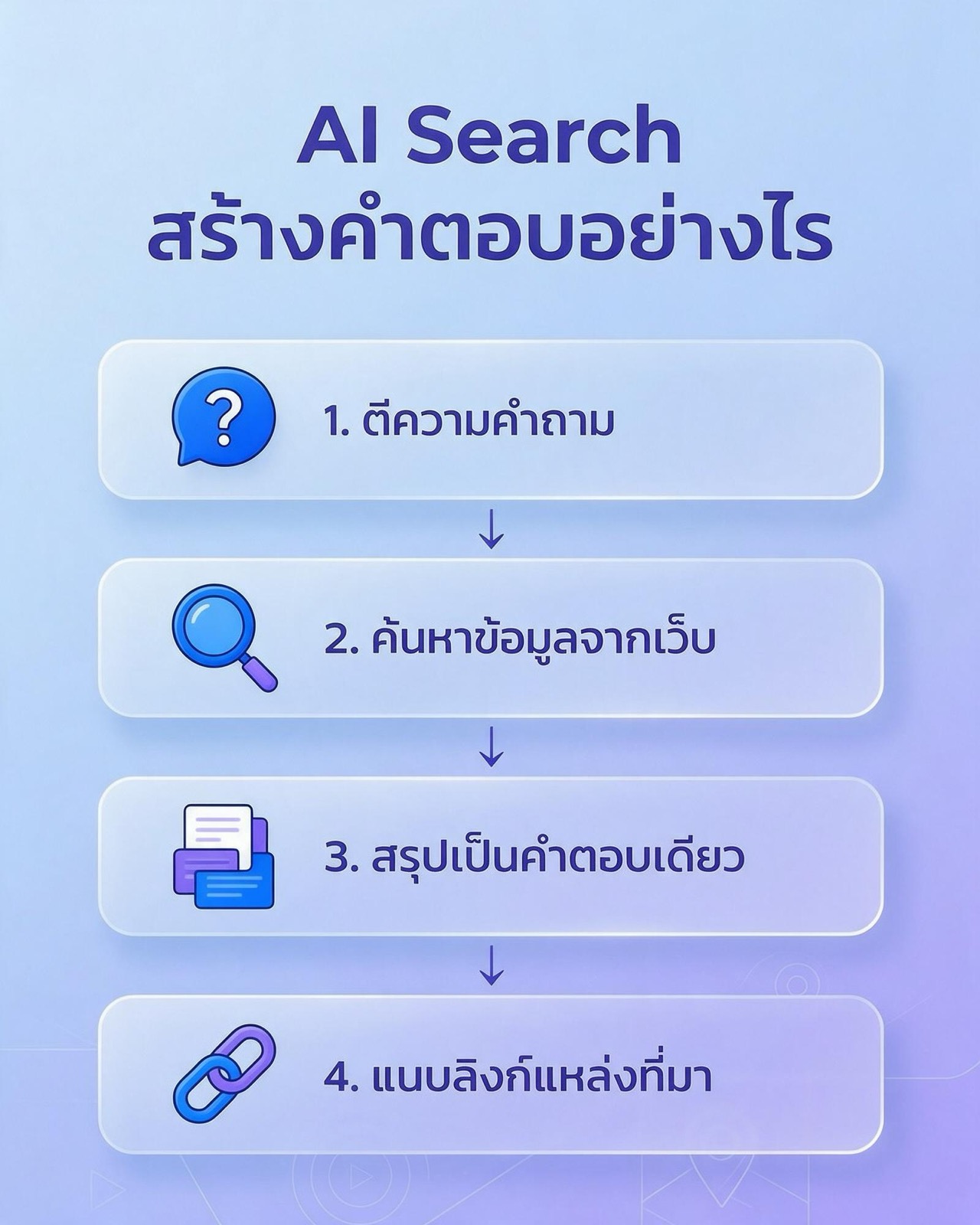
Each AI search tool has its own internal details, not all of them public, but the core structure they use is very similar. The field calls this approach Retrieval-Augmented Generation, or RAG, which literally means text generation supported by retrieved information. The process breaks down into four steps.
- 1. Interpret the question: the system reads the whole sentence to understand the intent, whether the user wants a definition, a comparison, steps or a recommendation, and which conditions are implied, such as location, timeframe or budget.
- 2. Search the web for information: the system turns the question into one or more search queries, pulls relevant pages from its own index or a partner search engine's index, and then cuts out only the passages likely to answer the question.
- 3. Summarise into a single answer: the language model reads the retrieved passages and writes a new answer in its own words, blending information from several sources.
- 4. Attach source links: the system ties sentences or paragraphs in the answer to the pages it drew on and shows them as links, numbered citations or source cards.
Steps one and two: from a question to a set of queries
What most people do not see is that one question you type may be turned into several search queries. Suppose someone asks, "Which Japanese restaurants in the Ari area are good for a business lunch meeting?" The system may split this into sub-queries about Japanese restaurants in that area, restaurants with private rooms, and lunch menus, then gather the results back together. This is the same principle as the query fan-out Google has described for AI Mode.
The consequence for site owners is that your page might be chosen because it answers one of the sub-queries well, even if it does not answer the user's whole question. Conversely, a page that ranks well for the main keyword is not guaranteed to be chosen if its content has no passage that answers a sub-query directly.
Step three: the model rewrites the answer
Once it has the passages, the language model does not paste them in directly. It rewrites them to read smoothly and drops what is irrelevant. Two things are worth knowing about this step. First, the model still mixes in knowledge it learned during training, so the answer does not always come entirely from the cited pages. Second, the model can produce text that sounds right but is factually wrong, which the field calls hallucination. The risk drops when the system has real sources to work from, but it does not disappear.
For ordinary users, the lesson is that an AI search answer is a good starting point, not a final conclusion. Especially for figures, prices, law, health and money, click through to the original source before you decide anything.
Step four: attaching sources
Attaching links lets users check, and it is the only channel through which source sites get traffic from AI search. But the position and look of those links differ a lot between tools. Some put small numbers at the end of sentences, some show cards at the side, and some hide them behind a button you must press to open. The further the links sit from the user's eye, the less likely anyone is to click them.
It is also worth knowing that the sentence being cited and the link being shown do not always match one to one. Sometimes the system shows links that are relevant in general rather than the actual source of that particular sentence, so checking back remains the reader's job.
Why AI search reduces website traffic
The shortest answer is that once the answer is on the screen, some users get what they need without clicking. This behaviour existed before AI in the form of featured snippets and other answer boxes, but AI search widens it a great deal, because it can answer more complex questions too, not only questions with a one-line answer.
The mechanisms behind fewer clicks
- A complete answer on one page: definition questions, basic steps and simple comparisons are answered in full inside the summary box, so the user has no reason to go further.
- Links pushed further down: when the AI box takes up the top of the screen, the former number-one result is pushed down, especially on mobile.
- Clicks split across several sources: one answer may cite several sites, so users who want to read more spread out across them instead of all landing on the single top-ranked site.
- Search moving outside Google: some people ask an AI assistant directly without ever passing through a results page. That traffic has not vanished, it has changed source, and analytics tools often lump it in with other channels.
What the studies have measured
The data published so far points in the same direction, but the size of the effect varies widely by type of site, and there is no study yet that uses Thailand data directly.
- An analysis of 54 clients' Google Analytics data by a marketing services group, reported by Digiday on 25 August 2026, found organic search sessions fell 10.5% between January 2025 and April 2026, while sessions from AI platforms rose 163%, and the key event rate for visitors from ChatGPT, Copilot, Gemini and Perplexity was 1.5 times that of organic search visitors. The sample was mostly brands in the United States and the United Kingdom.
- A University of Washington working paper, which has not been peer reviewed, estimates that AI Overviews cut search referrals to English Wikipedia by about 5% after Google made the feature a default in the United States in May 2024. Google disputes the paper's method, and the paper does not establish whether other kinds of site see the same effect.
What these two sets of numbers tell you is not that "every site will lose this much traffic". It is that the volume of clicks from search tends to fall, while in the 54-client data, visitors arriving from AI platforms, though fewer, completed key events at a higher rate.
Which pages are hit harder
Given the mechanisms above, the pages most at risk are those that answer a question that can be fully answered in one paragraph, such as glossary pages, general question pages, or "what is" articles that add nothing beyond the definition. Pages that are hit less are those where users need to do something next, such as product pages, booking pages, calculators, pages with business-specific information, and pages with opinions or first-hand experience that AI cannot summarise on the author's behalf.
How to check how much AI search affects your site
Before concluding that a traffic drop comes from AI search, check your own data first, because traffic can fall for many reasons, such as algorithm updates, technical problems or your business's seasonality. Below is what you can check with free tools most businesses already have.
- Compare impressions with clicks in Google Search Console: if impressions hold steady or rise but clicks fall and CTR drops while average position stays the same, that pattern is consistent with answers being shown on the results page without anyone clicking.
- Break it down by query type: question queries such as "what is", "how to" and "what is the difference" tend to be affected first, while queries containing your brand name or queries with buying intent tend to be affected less.
- Look at referral sources in GA4: traffic from ChatGPT, Perplexity, Copilot and Gemini usually appears as referrals from those tools' domains. Try creating a separate channel group for these sources to see the trend and the key event rate.
- Search for real with your customers' questions: take the questions customers ask most and put them to several AI search tools. Note whether your brand is mentioned, which sites are cited instead, and whether what the AI says about your business is accurate.
- Check Bing Webmaster Tools: because Copilot draws on Bing results, if your site has indexing problems in Bing, its chance of being cited in Copilot falls too.
The limitation to accept is that most analytics tools still cannot cleanly separate clicks from an AI box and clicks from normal results, so interpretation needs several signals together. Do not draw a conclusion from a single number.
What kind of content does AI like to quote?
This is a big subject with a lot of technical detail. Here is only a summary of the shared traits that follow from the mechanism described above.
- Answer directly in the first sentence: the system cuts content into passages, so a paragraph that opens with the direct answer is easier to use than one with a long lead-in.
- Clear structure: headings that match questions, lists of steps and tables help the system know which passage answers what.
- Verifiable information: figures with their sources, clear definitions, and business-specific information that cannot be found elsewhere.
- Technical accessibility: pages must be crawlable by Google, Bing and the bots of the AI providers you want to have access.
How to do each of these in depth is the work of AI SEO and GEO (Generative Engine Optimization). If you want a specialist team to plan this for you, see the AI SEO service page, the GEO service for AI search page, and the ChatGPT SEO page, which focuses on appearing in ChatGPT answers specifically.
AI search in the Thai market
For Thai businesses, there are some specific points to consider beyond the global picture.
- Thai language and transliterated terms: Searches can be typed in Thai, in English or as transliterated words. Some people type "ai search", others type the Thai transliteration. Content that naturally covers both helps the system match questions to your content more widely.
- Feature availability differs by country: AI search features roll out to countries and languages at different times, so what users in the United States see may not yet match what users in Thailand see. The most accurate method is to test real searches from accounts and devices in Thailand at regular intervals.
- Buying decisions still happen across many channels: a customer may research through search and then decide on social media or in chat, so measurement should look at the whole journey, not only clicks from search.
The overall picture is that AI search has not made search disappear, but it has changed who reads your site first. Where people used to read it directly, AI now reads it first and then retells it to people. Businesses that understand this mechanism can plan content and measurement closer to reality. The groundwork of SEO services, which is still the basis for being found in both Google and AI search, matters as much as it ever did.
FAQ about AI search
What is AI search and how is it different from classic Google?
AI search is search in which AI reads information from many sites and writes a summary answer with source links, while classic Google shows a list of links for users to choose from. Today Google itself offers both side by side: normal results, AI Overviews and AI Mode.
Which AI search engines are popular?
The main ones are Google AI Overviews, Google AI Mode, ChatGPT search, Perplexity, Microsoft Copilot and Gemini, which split into AI features inside existing search engines and chat-style AI assistants that can search the web. Availability of each feature varies by country and language.
How reliable are AI search answers?
AI search answers are reliable enough to use as a starting point, but they can still be wrong, because the model may mix in prior knowledge or produce text that does not match its sources. For anything affecting money, health or legal matters, always click through to check the original source first.
Does AI search mean nobody visits websites any more?
No, AI search reduces clicks on general questions, but visits do not disappear. The 54-client data reported by Digiday found the key event rate for visitors from AI platforms was 1.5 times that of organic search, even though the volume is still smaller.
Where should a business start in responding to AI search?
Start by measuring so you see the real picture: compare impressions with clicks in Search Console, separate AI platform traffic in GA4, and put your customers' questions to several AI search tools. Then plan content changes based on what the data shows.
If you want help seeing how your brand appears in AI search and what to fix first, the Relevant Audience team offers AI SEO and GEO services designed for Thai businesses. See the service pages above for details.