TL;DR
- Choose the primary platform before scripting: feeds need a scroll-stopping vertical opening, search-driven YouTube needs a horizontal video that confirms the answer.
- YouTube's help centre says that since 15 October 2024, square or vertical uploads of up to three minutes from standard channels count as Shorts.
- Write a two-column script (said vs seen) even for a 30-second video, and draft three hooks so the first three seconds carry the promise.
- AI tools help at each step: a chat assistant for ideas and scripts, ElevenLabs for voice-over, Descript for transcript editing, CapCut for captions, Runway for B-roll.
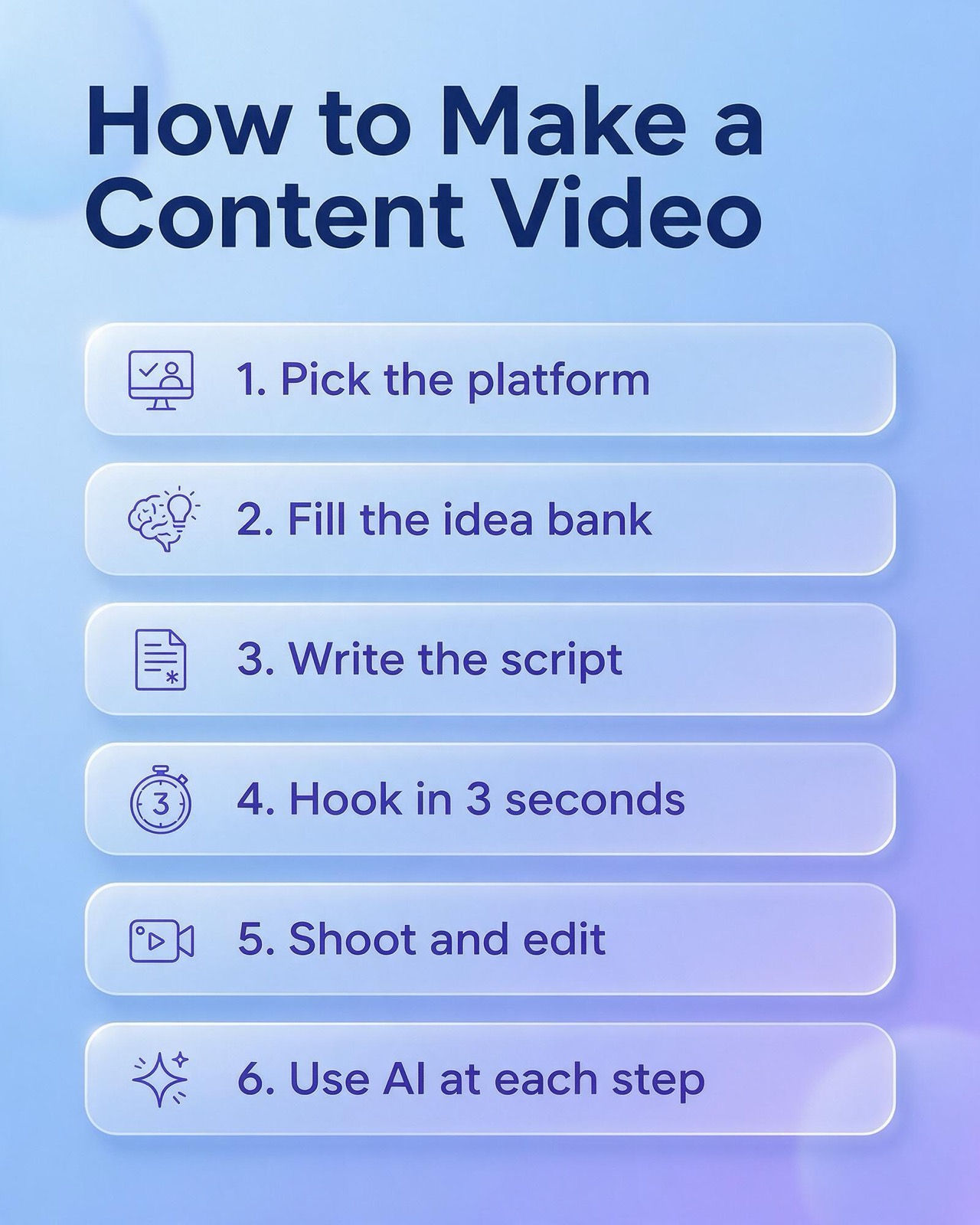
A content video is a short or long video made to inform, teach or entertain a specific audience rather than to sell directly, and making a good one comes down to six production decisions: the platform, the idea, the script, the opening hook, the shoot and edit, and where AI tools save time. This guide walks through each step in the order you would actually do it, with the checks that separate a usable content video from one that gets skipped.
It is a production guide. If you want the strategy side (which video types fit which business goal, and the KPIs to report), that belongs in a separate planning document. Here the question is narrower and more practical: you have decided to make content video, so how do you make each one well, and repeatably?
What is a content video, in production terms?
For planning purposes, a content video is any video whose main job is to be watched for its own value: a how-to, an explainer, a behind-the-scenes clip, a product walkthrough, an answer to a customer question. An ad is built to drive an immediate action and is usually placed with paid media. A content video earns attention on its own merits and is usually published to a channel, a page or a feed.
That difference changes production. An ad can lean on targeting to find the right viewer. A content video has to qualify its viewer by itself, in the first seconds, through the topic and the opening line. So the craft is concentrated at the front: a clear promise, delivered quickly, followed by a structure that keeps that promise without detours.
Most content video falls into a handful of production formats, and each one has a different cost profile:
- Talking head: one person explaining to camera. Cheapest to shoot, entirely dependent on the script and the speaker.
- Screen recording or demo: software, a website or a dashboard with voice-over. Easy to update, but easy to make boring if the cursor wanders.
- B-roll with voice-over: footage of products, places or hands at work, narrated. Needs more shooting time and a shot list.
- Text-on-screen or slideshow: captions and images carrying the message, often with music. Fast to produce.
- Interview or conversation: two people, real questions. Rich material, but heavy editing to cut it down.
Step 1: Pick the platform before you write anything
The platform decides the frame, the length budget and how people arrive at the video, so it has to be chosen before the script. A script written for a 16:9 YouTube tutorial does not survive being cropped into a vertical feed; the framing, the pacing and even the vocabulary change.
Three questions settle it:
- How do viewers find it? Feed-based platforms (TikTok, Instagram Reels, YouTube Shorts, Facebook) push video to people who did not ask for it, so the opening has to stop a scroll. Search-based viewing (YouTube long-form, video on your own site) reaches people who typed a question, so the opening has to confirm they found the answer.
- What frame does it need? Vertical for phone-first feeds, horizontal for long-form and website embeds. Shooting vertical and horizontal versions of the same scene is cheaper on the day than trying to crop one into the other later.
- How long can it run? Each platform sets upload limits and changes them, so check the current limit in the app or help centre before you plan a series. As one example, YouTube's own help centre states that since 15 October 2024 a standard channel's upload counts as a Short when it has a square or vertical aspect ratio and runs up to three minutes; a wider frame such as 16:9 is treated as a regular long-form video.
One practical rule: pick one primary platform per video and design for it, then adapt for the others. A video that tries to be native everywhere at once usually feels native nowhere.
Platform choice at a glance
| If your viewer... | Make the content video as... | The opening must... |
|---|---|---|
| scrolls a feed without searching | vertical short-form (Reels, Shorts, TikTok) | stop the scroll with a visual or a claim |
| searched a how-to question | horizontal long-form on YouTube | confirm the answer is coming, then deliver it |
| is already on your product or service page | short horizontal embed on your site | show the product or result straight away |
| follows your brand already | stories, lives or series episodes | reconnect with the last episode or a familiar face |
Step 2: Build an idea bank instead of brainstorming each week
Instead of inventing a topic every week, keep an idea bank: a single list, usually a spreadsheet, where every possible video gets a row with the question it answers, the format, the platform and a rough priority. When it is time to shoot, you pick from the bank.
The best ideas come from places where your audience has already shown what it wants to know:
- Customer questions. Sales calls, chat logs, LINE messages and support emails. Every question asked twice is a video.
- Search data. The search terms in Google Search Console and the suggestions YouTube shows as you type a topic both reveal the exact wording people use.
- Comments on your own videos. A comment that asks "how did you do X?" is a request for the next episode.
- Objections. Whatever makes people hesitate before buying (price, setup time, fit) can be answered on camera.
- Process and behind the scenes. How the product is made, packed, tested or delivered. Cheap to film.
Give each idea in the bank a one-sentence promise in the form "after watching, the viewer can...". If you cannot finish that sentence, the idea is still a theme, not a video. "Video about coffee" is a theme; "after watching, the viewer can dial in a pour-over in three adjustments" is a video.
Batch ideas into series. A series of five short videos on one subject is easier to script, shoot and edit in one session than five unrelated videos, and it gives returning viewers a reason to look for the next one.
Step 3: Write the script, even for a 30-second video
A script is the cheapest place to fix a video. Every problem you solve on paper (a missing step, a vague claim, a slow middle) costs minutes; the same problem found in the edit costs a reshoot.
A structure that works for most content video, short or long:
- Hook (first line): the promise or the problem, said plainly.
- Context (one or two lines): why this matters to this viewer now.
- Body (the steps or points): one idea per beat, in the order the viewer needs them.
- Payoff: the result, shown rather than described where possible.
- Next step: one call to action, not three. Follow for part two, read the guide, ask a question in the comments.
Write it as a two-column script: what is said on the left, what is seen on the right. The right column is where the shot list comes from, and it forces you to decide whether each line needs a new image or can stay on the speaker. For short vertical video, add a third note for on-screen text, for viewers watching with the sound off.
Checks before you shoot:
- Read it aloud and time it. Spoken pace is slower than reading pace.
- Cut every sentence that the visuals already say. If the viewer can see the box being opened, the script does not need "now I open the box".
- Replace adjectives with specifics. "Fast setup" becomes "set up in two clicks"; "great results" becomes the result itself.
- Make the call to action match the platform. A link in the description works on YouTube; on a feed, a comment prompt or "part two tomorrow" usually fits better.
Step 4: The 3-second hook
The 3-second target is a working rule for the craft, not a platform statistic: plan the first three seconds as if they were the only part of the video most people will see.
A hook has two parts that land together: what is seen and what is said or written. Both should point at the same promise.
Hook patterns that work for content video
- The result first: show the finished outcome (the cleaned dashboard, the plated dish, the before and after), then explain how.
- The direct question: "Is your ad budget leaking on the wrong searches?" Works when the viewer instantly knows whether it applies to them.
- The mistake: "Stop doing X when you film product shots." Calling out a common error qualifies the viewer and promises a fix.
- The specific number: "Three settings to change before your next live." A countable promise tells the viewer how long they are committing to.
- The pattern break: an unexpected first frame, a sound, or movement toward the camera. Use it to earn the second second, then deliver a real promise.
Hook mistakes that cost views
- Logo or intro first. A branded intro spends the seconds that matter most on something the viewer did not come for. Put the brand at the end or in a corner.
- "Hi everyone, welcome back". A greeting is not a promise. Start with the promise and greet later, if at all.
- A hook the video does not keep. If the opening promises something the video does not deliver, rewrite the opening.
- Text the viewer cannot read in time. On-screen text in the opening should be short enough to read at a glance.
Write three different hooks for every script and pick one in the edit, or test them as separate cuts. Hooks are cheap to write.
Step 5: Shoot and edit for the small screen
A modern phone is enough camera for most content video; the gains are in sound, light and stability.
On the shoot
- Sound first. A clip-on microphone close to the speaker usually beats any built-in microphone.
- Light the face. Face a window or a soft light; avoid a bright window behind the speaker.
- Lock the frame. A tripod or a stable surface removes the shake that makes a video feel amateur.
- Shoot more B-roll than you think you need. Close-ups of hands, screens and products cover cuts and keep the pace up.
- Record each line two or three times. Choosing between takes in the edit is easier than re-booking a shoot.
In the edit
- Cut the air. Remove pauses, false starts and filler words.
- Change the picture often. A cut, a zoom, a B-roll insert or on-screen text every few seconds keeps attention without feeling frantic.
- Caption everything. Captions serve viewers watching with sound off, viewers watching in a second language and viewers with hearing loss. Proofread them; automatic captions mishear names, brand terms and Thai-English mixes.
- Keep text inside the safe area. Feed platforms overlay buttons, captions and profile names near the edges. Keep key text away from the bottom and right edges.
- End on the next step. The last frame should carry the call to action you wrote in the script.
Step 6: Use AI tools at each step of production
AI tools now help at every stage of making a content video, from the first idea to the last caption. They are best treated as assistants that speed up drafts and repetitive work, while a person keeps the decisions about the promise, the facts and the brand.
Ideas and scripts
A general-purpose AI chat assistant can turn a list of customer questions into a ranked idea bank, draft a two-column script from an outline, or produce ten hook variations for one topic. Give it the real material (the actual questions, your product facts, your tone) rather than asking for "video ideas" in the abstract, and check every factual claim it writes before it reaches the script.
Voice-over
Text-to-speech tools generate narration from the script. ElevenLabs, for example, states on its own product page that its text-to-speech can generate speech in more than 90 languages, and Thai appears in its language list; its page also notes that language coverage differs by model, so check the specific voice in Thai before relying on it for a full video. A synthetic voice is useful for drafts, explainer videos and localised versions.
Editing
Descript lets you edit video by editing its transcript: its own site describes deleting words in the text to cut them from the video, removing filler words and retakes in a click, cleaning audio with a feature called Studio Sound, adding subtitles in one step, and correcting eye contact. For talking-head and interview content, transcript-based editing can remove much of the slow, frame-by-frame work.
Captions
CapCut's auto caption tool uses speech recognition to create captions from a video's audio, and its page says captions can be generated and translated in multiple languages. The page does not list Thai specifically, so test it on a Thai clip and proofread the result before publishing.
Generated footage
Generative video platforms such as Runway create video clips from text, images or existing footage; Runway's product page lists models including its own Gen-4.5 alongside third-party video and image models. Generated clips work well for abstract B-roll, transitions, backgrounds and concept visuals. They are a poor substitute for showing your real product, place or team, where viewers expect the real thing, and anything generated should be checked for errors and labelled where a platform's AI-content rules require it.
Where AI should not decide
- The promise of the video. Only you know what your customers actually ask and what you can honestly deliver.
- Facts, prices and claims. AI drafts can invent specifics. Every number in a script needs a source you trust.
- Thai-language wording. Have a native speaker read the script and captions.
- Rights. Check the licence terms of each tool for commercial use of generated voices, music and footage.
Which AI tool helps at which production step
| Production step | Example tool or tool type | What a person still checks |
|---|---|---|
| Idea bank and script draft | General AI chat assistant | Facts, the promise, brand tone |
| Voice-over | ElevenLabs text-to-speech | Thai pronunciation, rights for commercial use |
| Editing and audio clean-up | Descript (transcript editing, Studio Sound) | Pacing, cuts that change meaning |
| Captions | CapCut auto captions | Names, brand terms, Thai spelling |
| B-roll and visuals | Runway generative video | Visual errors, AI-content labelling |
A repeatable production checklist
Once the steps are clear, turn them into a checklist that every content video passes through. A shared checklist keeps quality steady when several people are writing, shooting and editing.
- Primary platform chosen, frame and length limit confirmed in the platform's current help pages.
- Idea pulled from the idea bank, with a one-sentence "after watching, the viewer can..." promise.
- Two-column script written, read aloud and timed.
- Three hooks written; one chosen or two set up as test cuts.
- Shot list taken from the script's visual column, with B-roll listed.
- Audio checked on set with headphones.
- Edit: dead air cut, picture changes every few seconds, captions proofread, text inside the safe area.
- Any AI-generated voice, footage or text reviewed by a person, with platform labelling applied where required.
- Call to action in the last frame matches the platform.
- After publishing, the result is noted against the idea in the bank so the next round of ideas is better informed.
Common mistakes and what each one costs
- Writing before choosing the platform. Costs a re-edit or a reshoot when the 16:9 script has to become a vertical video.
- Skipping the script for "quick" videos. Costs editing time, because rambling takes are slow to cut.
- Spending the opening on a logo. Costs the viewers who would have stayed for a clear promise.
- Uncorrected automatic captions. Costs credibility, especially when a brand or product name is misspelt on screen.
- Publishing generated footage unchecked. Costs trust when viewers spot visual errors, and can break platform rules on AI content.
- One-off topics with no series. Costs the returning viewer, who has no reason to look for the next video.
Making content video for Thai audiences
Scripts that use English marketing terms should either explain them or use the Thai term people actually search. Captions need special care: automatic speech recognition can struggle with Thai-English code-switching, brand names and transliterated words, so a manual proofread belongs in every edit.
Thai on-screen text has tone marks above and vowels below the line, so leave more vertical room around it than you would for English, and test it on a phone screen before export. If you publish the same video for Thai and English audiences, record the hook separately in each language rather than subtitling one into the other.
Finally, treat the questions in your LINE Official Account chats as a direct feed into the idea bank.
FAQ
What is a content video?
A content video is a video made to inform, teach or entertain an audience for its own value, such as a how-to, explainer or behind-the-scenes clip, rather than an ad built to drive an immediate sale. It is usually published to a channel or feed and has to earn attention through its topic and opening.
How long should a content video be?
A content video should be as long as its promise needs and no longer, within the platform's current limit. YouTube, for example, counts square or vertical uploads of up to three minutes as Shorts.
Do I need a script for a short video?
Yes, even a 30-second video benefits from a short script, because the first line is the hook. A few lines in a two-column format (what is said, what is seen) is enough.
Can AI make a whole content video for me?
AI tools can draft the script, generate a voice-over, edit by transcript, caption and create B-roll, but a person still needs to choose the promise, check facts and approve the result. Generated output can contain errors, and some platforms require AI-generated content to be labelled.
What makes a good hook in the first 3 seconds?
A good hook shows or states the video's promise immediately, with the visual and the words pointing at the same thing. Showing the result first, asking a question the viewer instantly recognises, or naming a common mistake all work; logos and greetings in the opening do not.
Getting help with content video production
If you would rather hand off part of the work, Relevant Audience's content marketing services cover planning and producing content across channels, and the AI video and photo production and AI video service pages explain how AI-assisted video is produced for brands. When a content video is ready to be put behind paid reach, see TikTok ads and YouTube ads.