TL;DR
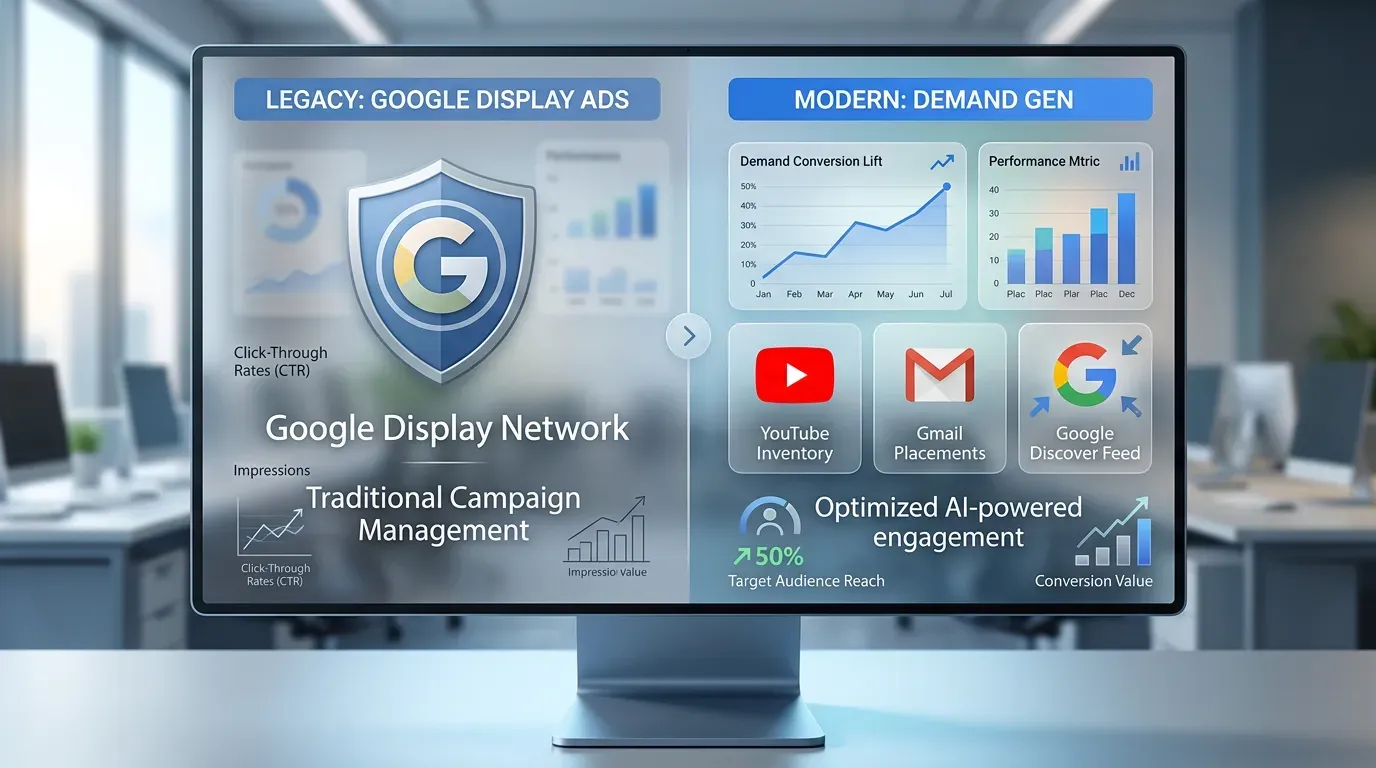
- Google is retiring the standalone Display campaign type but not the inventory: the Google Display Network, reaching over 2 million websites, videos and apps, moves inside Demand Gen alongside YouTube, Discover, Gmail and Google Maps inventory.
- A migration tool starts appearing in eligible accounts in June 2026; after that phase Google stops allowing new standalone Display campaigns, and full automatic migration is expected to complete through 2027.
- Demand Gen adds carousel ads, expanded video formats, lookalike segments, generative AI image tools, channel-level reporting, Google Maps inventory in beta, and new bidding options including target CPC and campaign total budgets.
- Advertisers who added GDN inside Demand Gen saw an average 9.5% increase in ROI, and food delivery platform GoFood reported a 24% decrease in cost per acquisition and a 19% increase in conversion volume after the move.
- The main migration risk named is that placement exclusions, app exclusion lists, brand safety controls, device targeting and audience layering may not transfer cleanly, so the post advises exporting and documenting them before the move.
If you’ve been running Google Display Ads campaigns for years, your setup is about to look very different. Google is officially retiring the standalone Display campaign type and folding Google Display Network inventory into Demand Gen campaigns. Whether that excites you or makes you nervous, it’s worth understanding exactly what’s changing, what’s staying the same, and how to get ahead of it before the migration becomes mandatory.
Here’s the thing that trips people up: Google Display Network inventory is not going away. The campaign type managing it is. That’s a meaningful distinction, and every advertiser relying on GDN traffic needs to get clear on it now.
The rollout happens gradually through 2027, which gives you time to prepare. But don’t let that runway lull you into waiting for Google to handle things automatically. Advertisers who get proactive now will be in a far better position than those who wake up one day to find their campaigns moved with settings they never reviewed.
- What Is Actually Changing With Google Display Ads
- The Migration Timeline and What to Expect Phase by Phase
- How Advertisers Should Prepare Before the Transition Hits
What Is Actually Changing With Google Display Ads
Before getting into timelines and tactics, it helps to understand what Google is actually doing here. This isn’t a minor tweak to a campaign setting. It’s a structural change to how Google Display advertising gets managed inside Google Ads.
The Display Campaign Type Is Being Retired, Not the Inventory
The Google Display Network, which reaches over 2 million websites, videos, and apps, is staying intact. Advertisers can still run ads across that inventory. What’s changing is the campaign structure used to manage and optimize those ads. Going forward, Google Display Network inventory will live inside Demand Gen campaigns alongside YouTube, Discover, Gmail, and Google Maps inventory. The standalone Display campaign type gets retired. That familiar workflow of creating a traditional Display campaign will eventually no longer exist as a separate option inside Google Ads.
For advertisers who’ve spent years building out Display campaigns with specific placements, exclusion lists, audience layers, and budget structures, this is a real operational change. The inventory is still there, but the controls, settings, and reporting work differently inside Demand Gen.
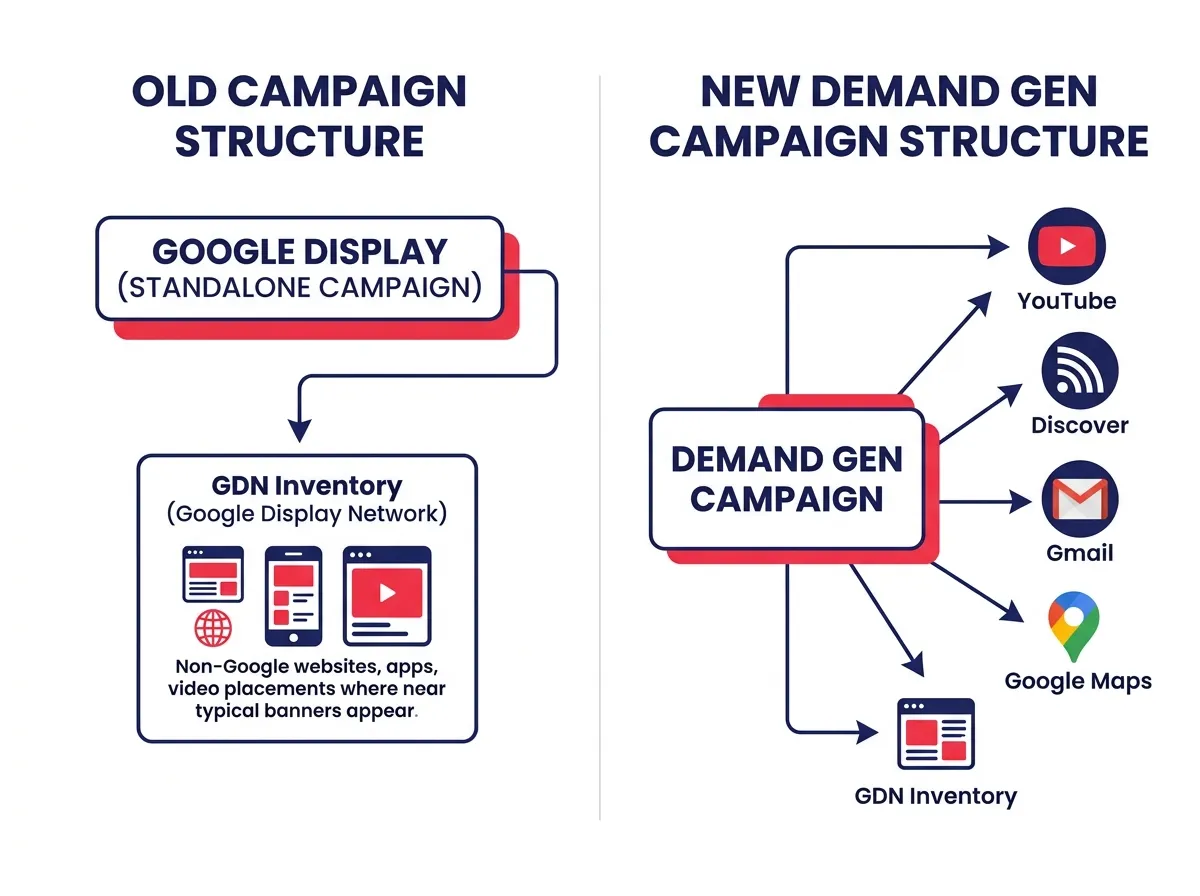 Google has been moving in this direction for a while. Demand Gen has steadily absorbed more of Google’s visual advertising surfaces over the past couple of years. Video Action Campaigns were already consolidated into Demand Gen. Display following that same path fits the pattern Google has been running across the platform.
New Features Demand Gen Brings to the Table
Part of why Google is making this shift is that Demand Gen has grown into a more capable campaign type than traditional Display. Advertisers moving into Demand Gen will get access to tools and formats that simply weren’t available in the old setup.
Here’s what becomes available inside Demand Gen that traditional Google Display campaigns didn’t offer:
- Carousel ads for showcasing multiple products or messages in a single unit
- Expanded video ad formats across YouTube and other Google surfaces
- Lookalike segments to find new audiences that resemble your existing customers
- Generative AI image tools for creating and testing creative assets faster
- Channel-level reporting so you can see how GDN, YouTube, and other placements perform separately
- Google Maps inventory (currently in beta)
- New bidding options, including target CPC and campaign total budgets
These aren’t just feature checkboxes. Lookalike segments open up prospecting capabilities that GDN advertisers didn’t previously have. Carousel ads change what’s possible creatively. Channel-level reporting finally gives you visibility into how different surfaces are performing rather than lumping everything together.
That said, gaining new features also means adjusting to a new environment. Advertisers comfortable with how traditional Display campaigns worked will need to figure out where settings live, how reporting is structured, and how bidding behaves inside Demand Gen. That learning curve is real, and it’s better to work through it on your own terms than in the middle of an automatic migration.
The Migration Timeline and What to Expect Phase by Phase
Google is rolling this out in stages rather than flipping a switch overnight. That phased approach gives you room to breathe, but the situation will look different depending on when you’re reading this and what account type you’re running.
When the Migration Tool Goes Live and What It Does
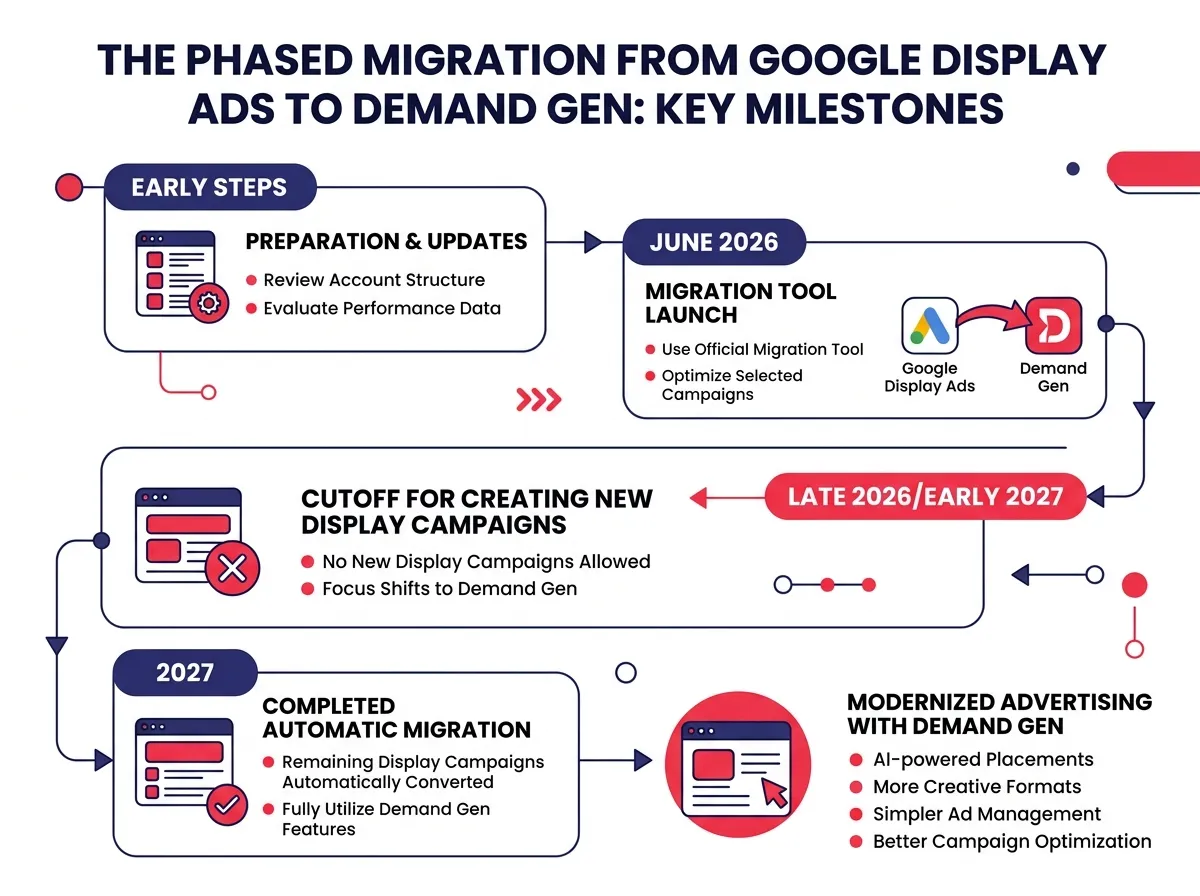
Starting in June 2026, eligible advertisers will begin seeing a migration tool inside their Google Ads accounts. This tool moves existing standalone Display campaigns into the Demand Gen campaign structure.
The migration tool isn’t instant or fully automatic at first. Google is giving advertisers a window to use it manually, review settings during the transition, and make adjustments before campaigns go live inside Demand Gen. That window matters because it gives you a chance to confirm that placement exclusions, audience lists, and other controls transferred correctly, rather than just assuming everything came through clean.
After that initial phase, Google stops allowing new standalone Display campaigns. Existing campaigns stay editable for a period, but they’ll eventually be moved automatically into Demand Gen if you haven’t handled the migration yourself.
The full automatic migration is expected to complete through 2027. Exact timing for individual accounts will vary, but the direction is clear. Every Google Display Ads campaign will eventually be managed inside Demand Gen.
 ### What Happens If You Do Not Migrate Manually
If you take no action, your campaigns will still move into Demand Gen. Google has confirmed that remaining eligible campaigns will be automatically transitioned. So operationally speaking, this migration happens whether you participate or not.
The problem with waiting is what you might lose in the process. Advertisers who’ve spent years refining placement exclusions, building app exclusion lists, and layering audience targeting have a lot of careful setup baked into those campaigns. Automatic migrations don’t always carry every nuance of those settings over cleanly.
Placement exclusions are particularly worth watching. Many GDN advertisers have extensive exclusion lists built up over months or years of reviewing placement reports and removing low-quality inventory, parked domains, irrelevant apps, low-engagement websites. If those exclusions don’t transfer cleanly, spend starts going to placements you already decided weren’t worth paying for.
Brand safety controls, device targeting preferences, and audience layering logic can also behave differently inside Demand Gen compared to how they worked in a traditional Display campaign. Catching those gaps before automatic migration is the goal. Discovering them after means troubleshooting live campaigns instead.
How Advertisers Should Prepare Before the Transition Hits
The most practical mindset shift here is treating this migration as a project with a deadline rather than something to sort out later. Getting ahead of it means auditing what’s currently in your Display campaigns, rebuilding the important pieces inside Demand Gen before migration becomes mandatory, and tracking performance carefully after the move.
Auditing Your Current Display Setup Before You Migrate
Before touching anything related to Demand Gen, do a thorough audit of your existing Display campaigns. You want to know exactly what you’ve built so you can make sure it survives the transition.
Here’s what to review and document:
- Placement exclusions: Export your full list of excluded placements and apps. This is probably the most important thing to preserve.
- Managed placements: If you’re running on specific hand-picked placements, note those separately from your broader targeting.
- App exclusions: Review whether you’ve excluded mobile app categories or specific apps, and verify those settings are documented.
- Audience layering: Document how you’ve structured audience targeting, including any observation-only layers versus targeting layers.
- Device targeting adjustments: Note any bid adjustments or device restrictions you’ve applied.
- Brand safety controls: Check what content exclusions you have set at the campaign level.
- Traffic quality patterns: Pull placement reports and look at where your current traffic is coming from so you have a baseline to compare against after migration.
Once you’ve documented your setup, spend time manually rebuilding those configurations inside a Demand Gen campaign before migration happens. Testing things in a controlled environment now is far easier than diagnosing performance issues after campaigns have been automatically moved.
This is also a good moment to think about the creatives. Demand Gen supports carousel ads and expanded video formats that traditional Display campaigns never touched. If your current creative library is mostly static banners, you have time to build out new formats before migration so your campaigns can actually take advantage of what Demand Gen offers.
Performance Metrics to Watch Closely After Migration
Even a well-planned migration will change how campaigns behave. Setting clear expectations upfront and knowing what to watch will help you respond quickly if something shifts.
On the positive side, the data from advertisers who have already added GDN inside Demand Gen campaigns is encouraging. On average, advertisers see a 9.5% increase in ROI when combining GDN with Demand Gen. Food delivery platform GoFood, for example, reported a 24% decrease in cost per acquisition and a 19% increase in conversion volume after making the move.
Those are real numbers worth taking seriously. But averages cover a wide range of actual results. Performance depends on creative quality, how well your audience strategy is set up, your conversion tracking, and your campaign goals. Don’t assume the average applies to your account automatically.
After migration, keep a close eye on these areas:
- Audience expansion behavior: Demand Gen can expand audiences more aggressively than traditional Display. Watch whether your reach is going to the right users or broadening in ways that hurt conversion rates.
- Placement visibility: Check whether you can still see the level of placement reporting you’re used to. Channel-level reporting inside Demand Gen is an improvement, but verify the granularity matches what you need.
- Inventory allocation: Monitor how the budget is being split across GDN, YouTube, Discover, and other surfaces inside Demand Gen to understand where the spend is actually going.
- Bidding behavior: Demand Gen has different bidding options than traditional Display. Confirm your target CPA, target ROAS, or other bid strategies are behaving as expected in the new environment.
- Budget pacing: Large campaigns sometimes pace differently after a structural change. Watch spending patterns in the first few weeks post-migration.
Give campaigns a few weeks to stabilize before drawing conclusions, but keep your monitoring intervals short enough to catch problems early. A month of unchecked issues can do real damage to both performance and budget.
Google’s decision to move Google Display Ads into Demand Gen fits a pattern the company has been running for a while now, consolidating visual inventory and automation into fewer campaign types inside Google Ads. The change is significant, especially if GDN traffic is a big part of your mix. But the core opportunity hasn’t gone anywhere. You can still reach audiences across millions of websites, apps, and videos. The job now is making sure everything you’ve carefully built inside Display campaigns carries forward cleanly into Demand Gen, and taking the time to explore what the new setup can do that your old campaigns couldn’t.