
TL;DR
- Google said it would start enforcing a hard cap on reporting data retention on 1 June 2026.
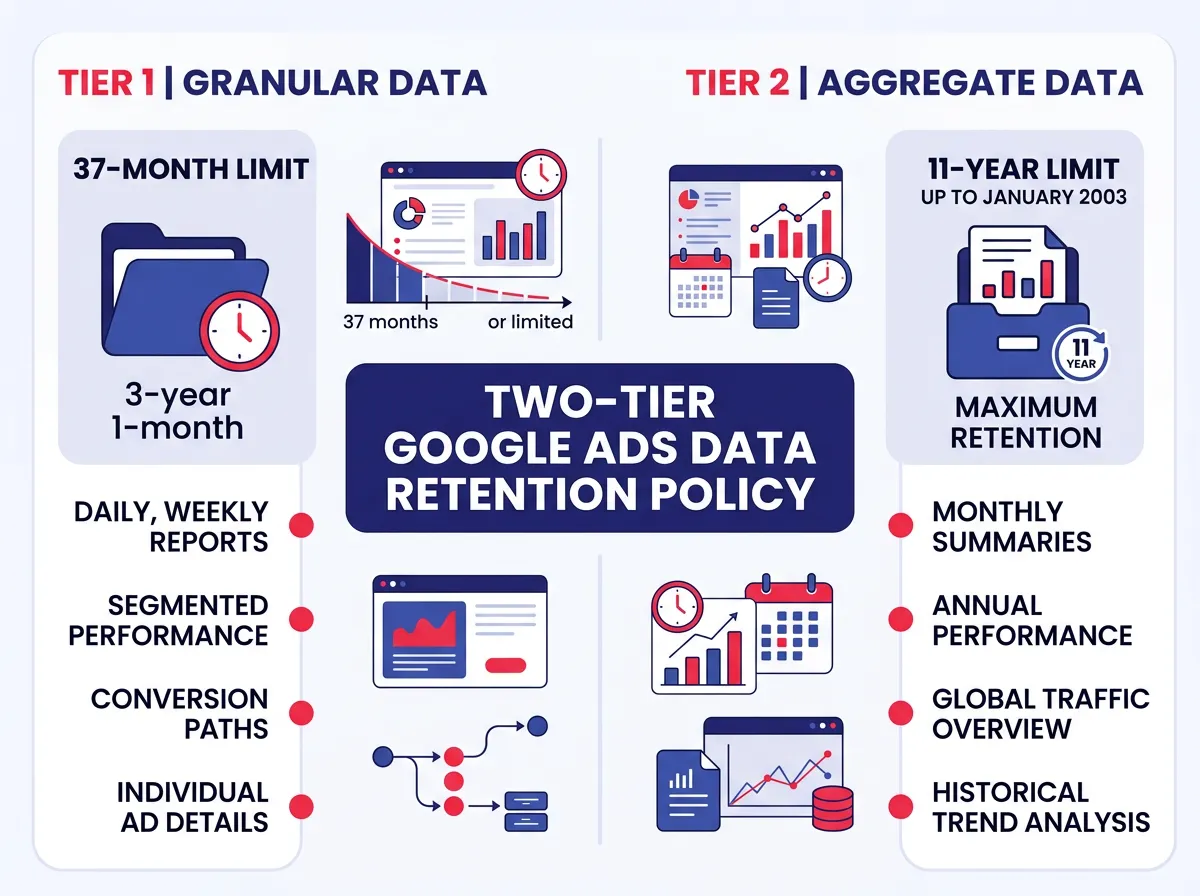
- Retention runs on two tiers: granular hourly and daily performance data is kept up to 37 months, while aggregate monthly and annual summaries are kept up to 11 years.
- Marking a campaign, ad group or keyword as Removed only changes its status; the historical performance data stays in the account and can still be pulled in reports.
- Only a few things are truly purged: Customer Match lists on request or at expiry, and shared data access when a Google Analytics property or manager account is unlinked. Change History is a permanent, immutable audit trail that neither the advertiser nor Google can wipe.
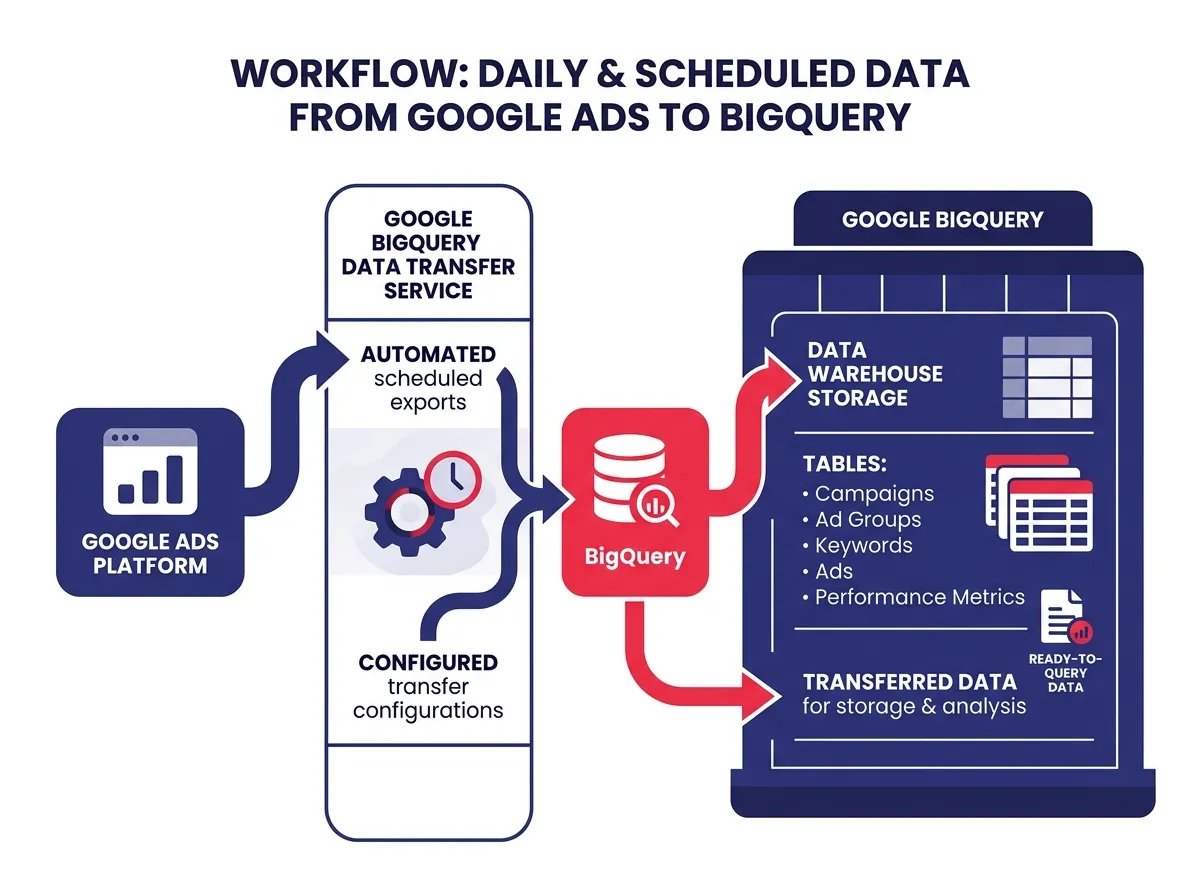
- For archiving, the post points large accounts to the BigQuery Data Transfer Service and smaller ones to Google Ads Scripts pushing metrics into a Google Sheet, and advises waiting 5 to 7 days after a period closes before treating cost and conversion figures as final.
Google quietly announced it will start enforcing a hard cap on reporting data retention on 1st of June 2026, and advertisers are scrambling to figure out what they’re actually losing and what they need to save before it disappears. The confusion is understandable, and a lot of it comes from not knowing what “deletion” even means inside Google Ads.
There’s a real difference between Google’s platform-mandated data deletion and simply hiding campaigns in the interface. One is a settings change you control. The other is a system-level enforcement that affects what historical data you can pull in reports going forward. Getting that distinction right is step one.
This article breaks down exactly what the new retention policy changes, what stays safe, and what you should be doing right now to preserve your data before the enforcement window closes.
- What Google Is Actually Deleting and What Just Gets Hidden
- How to Archive Your Google Ads Data Before the Deadline
What Google Is Actually Deleting and What Just Gets Hidden
Most of the anxiety right now comes from one misunderstanding: that pausing or removing campaigns means data is gone. It’s not. But the 2026 retention policy does introduce a real hard limit on certain data types, and that part is worth taking seriously.
The 37-month vs. 11-year retention split explained
Here’s the core of what changed. Google Ads now runs on a two-tier data retention structure:
- Granular performance data (hourly, daily breakdowns): retained for up to 37 months
- Aggregate reporting data (monthly and annual summaries): retained for up to 11 years
Most advertisers have no idea these two tiers even exist. If you’ve been running campaigns for three or more years and you rely on day-level or hour-level breakdowns to analyze trends, that data is now on a clock. After the 37-month cutoff, it’s gone from the platform. No native Google Ads report will bring it back.
This matters a lot for seasonal businesses, long-term testing analysis, and agencies trying to benchmark performance across multi-year client relationships. The aggregate data sticks around, but it gives you far less context than granular daily metrics do.
 ### Removing a campaign vs. losing its data forever
This is where a lot of advertisers panic for the wrong reason. When you mark a campaign, ad group, or keyword as “Removed” inside Google Ads, you’re only changing its status. Nothing gets deleted.
Every piece of historical performance data tied to that entity stays in your account. You can still pull it in reports, filter by it, and compare it to active campaigns. The removed status just means the campaign stops serving ads. The Google Ads data attached to it stays fully accessible.
So if you removed campaigns two years ago because they were underperforming, relax. That history is still there. The 2026 retention policy is about time-based system limits on granular metrics, not about what happens when you manually change a campaign status.
The only data that can actually be purged
There are only a handful of scenarios where data can be truly deleted from a Google Ads account:
- Customer Match lists: You can upload and delete audience lists, and Google purges data from those lists on request or when they expire.
- Linked account data: When you unlink a Google Analytics property or a manager account, certain shared data access gets cut off.
- Change History: This one’s worth noting. Your Change History log is a permanent, immutable audit trail. You can’t wipe it, and neither can Google.
That last point is actually good news for agency account managers. If a client ever questions a bid change or a budget adjustment from months ago, Change History is your documentation. It stays, no matter what.
How to Archive Your Google Ads Data Before the Deadline
Now that the policy is clearer, the real question is what to actually do about it. The answer depends on your account size and how much historical data you genuinely need. But waiting is not a strategy.
BigQuery Data Transfer Service: the gold standard for automated warehousing
For agencies and enterprise teams managing large accounts, the BigQuery Data Transfer Service is the most reliable option out there. It connects directly to your Google Ads account and automatically exports full reporting data on a scheduled basis into a data warehouse you control.
Why does this matter? Because once data ages out of the 37-month window on Google’s end, it’s gone. But if you’ve been exporting to BigQuery consistently, you still have it. You own the warehouse, so you set the retention rules.
There’s some technical setup involved, but once it’s running, it’s largely hands-off. The exports are scheduled, the data is structured for SQL querying, and you can join it with other sources like CRM data or third-party analytics. For any team doing serious year-over-year analysis or managing clients with long campaign histories, this isn’t really optional.
 ### Google Ads Scripts and the API for smaller accounts
Not every account needs a full data warehouse. For smaller businesses or solo advertisers, there are lighter-weight ways to preserve your Google Ads data without needing an engineering team.
Google Ads Scripts let you write simple JavaScript-based automations that pull key performance metrics on a recurring schedule and push them into a Google Sheet. You can set this to run daily or weekly, creating a rolling archive that lives in your Google Drive. It costs nothing, requires no infrastructure, and takes a few hours to configure if you’re comfortable with basic scripting.
For teams that need more control, the Google Ads API gives you programmatic access to pull specific metrics and segments at whatever level of granularity you need. If you have a developer available, this is a solid option for building a custom reporting pipeline that captures exactly the dimensions your team actually uses.
The important thing with both approaches: start before the deadline. If you wait until the 37-month window has already passed on some of your data, no script or API call can recover it.
Why your historical cost data sometimes changes after you pull it
One thing that catches a lot of advertisers off guard when they start archiving data is noticing that numbers shift slightly after export. You pull your data on Monday, and by Thursday the cost or conversion figures look a little different. This isn’t a bug, and it’s not Google adjusting your records.
Metric instability in Google Ads is normal. Cost and conversion data can fluctuate for several days after a reporting period closes, for two reasons: backend processing latency and attribution adjustments. Google processes an enormous volume of ad interactions, and some signals (view-through conversions and cross-device attribution touchpoints in particular) take time to fully register.
If your archived numbers shift slightly after export, that’s standard behavior. The best practice is to wait 5 to 7 days after a period closes before treating those numbers as final. If you’re building a BigQuery pipeline, you can configure exports to pull data for recent periods more than once and update records accordingly.
The bottom line: the 2026 Google Ads data deletion policy isn’t designed to wipe your campaign history overnight. But it does set a real ceiling on how long granular performance data lives on Google’s servers. The advertisers who’ll feel this most are the ones who never built an external archive and rely entirely on native Google Ads reports to look back more than three years. If that sounds like your account, now is the time to act.