TL;DR
- JavaScript hydration is defined as the browser downloading an HTML shell and then running JavaScript to fill in the actual content, leaving a gap between what the server first sends and what the user finally sees.
- Googlebot processes JavaScript through a headless Chrome-based service, but GPTBot, ClaudeBot and the crawlers feeding Perplexity's index prioritise raw HTML snapshots and mostly skip JavaScript execution entirely.
- The self-diagnosis is to disable JavaScript in the browser and reload an important page, or request the raw HTML with curl and compare it against the rendered version; anything that appears only in the browser is invisible to AI crawlers.
- Fixes named are server-side rendering and static site generation, supported natively by Next.js, Nuxt, Astro and SvelteKit, plus JSON-LD schema, semantic elements such as article, main and section, primary content placed high in the DOM, and no key content hidden behind tabs or accordions.
- To stop regressions, the post recommends documented template-level rendering standards classifying retrieval-critical content such as product descriptions, pricing information and article body text, with a rendering review required before new feature work merges.
-
How JavaScript Hydration Makes Content Invisible to AI Crawlers
-
Fixing AI SEO and GEO visibility through server-side rendering and structural signals
Your website passes every performance test, loads in under two seconds, and looks great on every device. Yet AI search systems like ChatGPT, Perplexity, and Claude may be citing your competitors instead of you. The reason has nothing to do with your content quality or your backlink profile. It has to do with when your content actually appears in the HTML response.
Modern JavaScript frameworks create a rendering gap. Users see content that AI crawlers never receive, because that content loads after the initial HTML snapshot. Most Seo Audits miss this issue completely, and Google Search Console data does not reflect how LLM crawlers actually ingest your pages.
That’s why JavaScript hydration is your biggest SEO and GEO blind spot right now.
How JavaScript Hydration Makes Content Invisible to AI Crawlers
JavaScript hydration is the process by which a browser downloads an HTML shell, then runs JavaScript to fill in the actual content. For users, the experience feels seamless. The page looks complete. But what the server initially sends and what users eventually see are two different things.
That gap is where your AI visibility problem lives.
LLM Crawlers Aren’t Googlebot
Google and Bing have invested heavily in rendering pipelines. Googlebot uses a headless Chrome-based service that processes JavaScript
and indexes the fully rendered version of a page. It’s not instant, and there are delays, but Google does eventually see most of your content.
LLM crawlers work differently. GPTBot, ClaudeBot, and the crawlers that feed Perplexity’s index prioritize raw HTML snapshots. Most of them skip JavaScript execution entirely, built for speed and scale rather than full browser rendering.
This means the AI search gap and the traditional SEO gap are separate problems with separate causes. Scoring well in Google does not confirm that AI systems can read your content. Two different crawling behaviors, and conflating them leads to missed fixes.
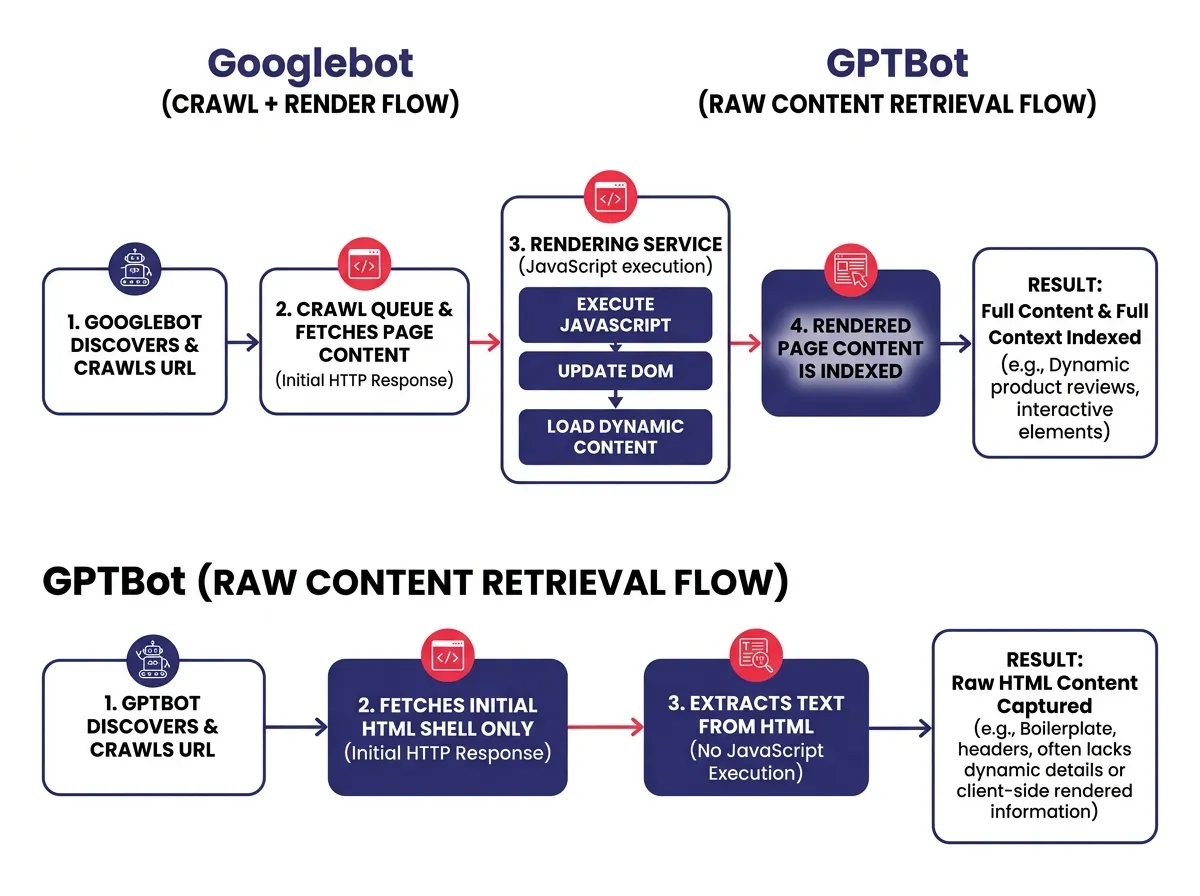 ### The Empty Shell Problem: What GPTBot and ClaudeBot Actually Receive
When a site is built with React, Vue, Next.js in client-side mode, or similar frameworks, the raw HTML often looks like this to a crawler that does not execute JavaScript:
- A
<div id="root"></div>or similar wrapper - Navigation links
- Maybe a page title
- Scripts and stylesheet references
- No actual body content
The product descriptions, article text, service explanations, FAQs, and data tables that make your pages valuable are all injected after JavaScript runs. AI crawlers requesting the page without executing scripts receive an empty shell and move on.
This is not a rare edge case. It’s common across ecommerce marketing platforms, SaaS websites, news sites, and marketing pages built with modern component-based frameworks.
How to diagnose your own retrieval gap
The fastest diagnostic test requires no special tools. Open your browser, disable JavaScript from the developer settings, and reload any important page. What you see is approximately what most AI crawlers receive.
If your content disappears, you have a retrieval gap. If headings, body text, and key product or service information still render, you’re in better shape.
For a more thorough audit, use curl to request your page’s raw HTML and compare it against the fully rendered version in your browser. Any content that appears in the browser but not in the curl output is invisible to AI crawlers in AI search and won’t contribute to your GEO visibility.
Fixing AI SEO and GEO visibility through server-side rendering and structural signals
Knowing you have a retrieval gap is the first step. Fixing it requires decisions at the infrastructure level, not just the content level. The good news is that the fixes are well-established and don’t require rebuilding your entire frontend.
SSR, SSG, and Why the Initial Payload is Everything
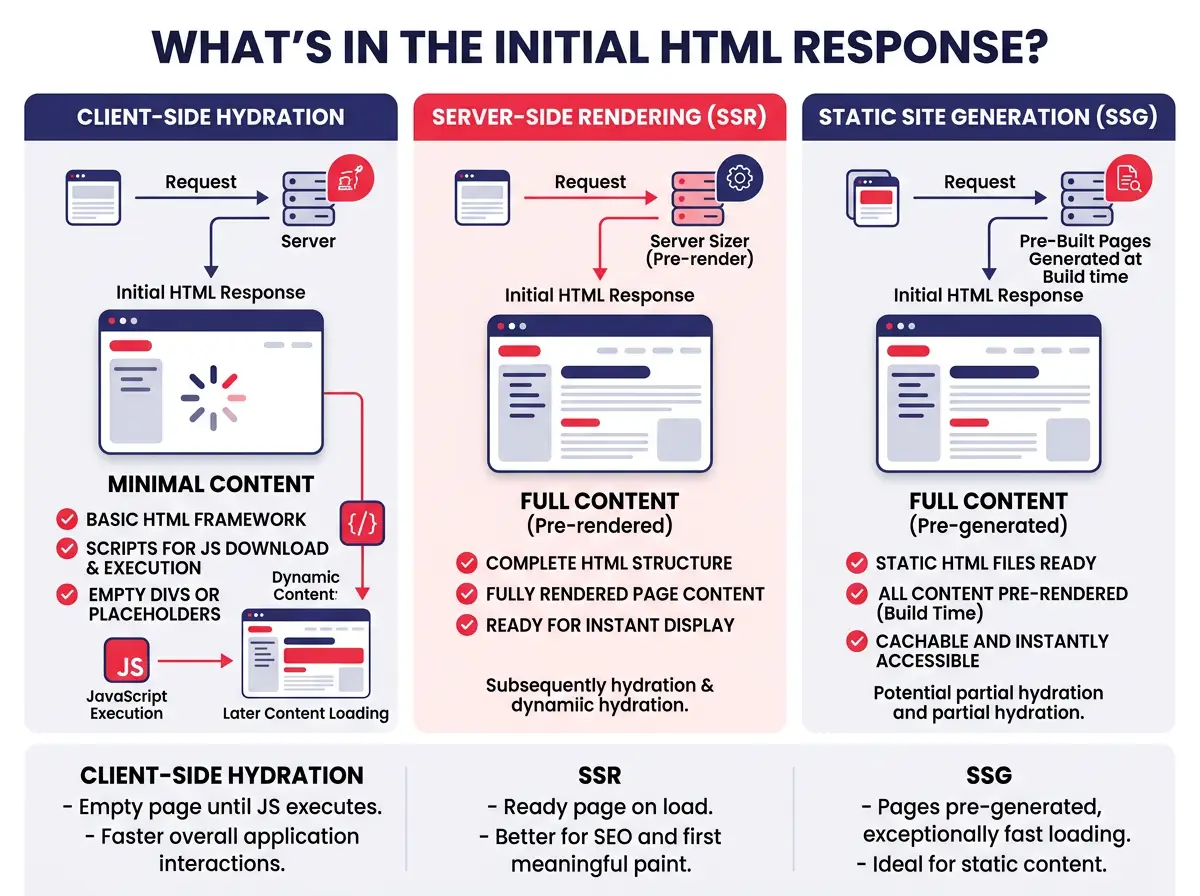
SSR and SSG ensure your content exists in raw HTML before any JavaScript runs — the single most impactful technical change you can make for AI SEO and GEO.
- SSR (Server-Side Rendering) generates the full HTML on the server before sending it to the browser
- SSG (Static Site Generation) pre-builds pages at deploy time
- Every crawler benefits because critical body content is present in the initial payload, regardless of JavaScript execution capability
- Major frameworks like Next.js, Nuxt, Astro, and SvelteKit all support both approaches natively
- Hybrid approaches (static shells + client-side data fetching) work fine for performance, but any content that matters for search and AI citation must be in the server-rendered payload
 ### Structural Signals That Help AIs Trust and Cite Your Content
Rendering fixes get your content into the HTML. Structural signals determine whether AI systems trust and cite that content.
JSON-LD schema markup is one of the most reliable signals you can add. It provides clean, structured text that LLMs can parse without interpreting your visual layout. For articles, products, FAQs, and local businesses, JSON-LD gives AI systems clear metadata about what your content covers and who produced it.
Beyond schema, pay attention to your text-to-code ratio. Pages bloated with repetitive navigation blocks, footer links, cookie consent scripts, and tracking code push your actual content further down in the HTML. AI systems parsing your page give more weight to content that appears prominently in the document structure, so trimming boilerplate helps surface what actually matters.
Structural improvements worth prioritizing:
- Place primary content high in the DOM, before navigation or sidebar elements, where possible
- Use semantic HTML elements like
<article>,<main>, and<section>to signal content hierarchy - Add JSON-LD markup for your primary content type on every key page
- Audit your text-to-code ratio using tools that measure raw content versus markup overhead
- Avoid hiding key content behind tabs or accordions that only load on user interaction
Building a Governance Workflow
Technical fixes tend to regress when teams ship new features. A rendering decision made correctly today can be quietly reversed three sprints later when a developer reaches for client-side data fetching on a new content block.
Governance workflows prevent this. The approach isn’t complicated: establish template-level rendering standards that classify which content types must always be in the server-rendered payload. Write it down as a documented rule, not an informal preference passed around in Slack.
A rule might state that product descriptions, pricing information, and article body text are retrieval-critical and must never be injected client-side. New feature work touching those content types requires a rendering review before it merges.
That’s a clear standard, and it protects your AI SEO and GEO visibility as your frontend architecture changes, team members turn over, and new frameworks get adopted.
The organizations doing well in AI-powered search right now are generally treating content retrieval as a first-class technical requirement, the same way they treat page speed or accessibility. Visibility to AI systems isn’t automatic. It takes the same deliberate engineering that any other performance goal demands.