
TL;DR
- Meta Ads Manager now has six campaign objectives: Awareness, Traffic, Engagement, Leads, App Promotion and Sales. Older ones like Reach, Video Views and Conversions were folded into them as sub-options.
- An objective is an instruction about which behaviour Meta should hunt for, so judging an Engagement campaign by revenue measures something you never asked the system to find.
- The attribution setting sits at ad set level and covers click-through and view-through windows. Widening it raises the reported conversion count without changing real sales.
- The Pixel sends events from the browser and the Conversions API sends them from your server. Run both with a matching event ID so one event is not counted twice.
- No reliable public CTR or CPM benchmark exists for Thai Facebook advertising, so build a baseline from your own account with a saved column preset and equal-length comparison windows.
When Facebook ads are not working, the problem is usually not the platform. It is that the campaign objective you picked and the result you actually want are two different things. Meta's delivery system only looks for people likely to do the thing you told it to look for, so if you tell it to find people who like and share posts, it will find people who are good at liking and sharing, not people who reach for their wallet. Two things fix this: knowing what the facebook ads objectives are and what each one instructs the system to hunt for, and setting up measurement so you read the same set of numbers every time you open a report.
This guide starts with the symptoms people hit when a campaign stalls, moves to why most businesses still cannot drop this channel, and then goes deep on the two steps most advertisers skip: choosing the objective, and reading the numbers honestly.
Facebook ads not working: where the real problem usually sits
When a campaign underdelivers, the first two suspects are always budget and targeting. Both are possible. In practice, though, the cause sits earlier, in how the campaign is built and how the results are read. Work through this list before you add money.
Boosting a post instead of building a campaign
The Boost button under a post is a shortcut that removes most of the controls that matter. You get a limited objective choice, little control over placements, and no way to test several creatives inside one structure. The result is usually engagement that looks healthy on the post itself, with no way to know how many of those people reached a checkout page. If the goal is sales or leads, build the campaign in Ads Manager from the start.
Choosing one objective and judging it by a different number
This is the most common blind spot. The campaign is set to Engagement, but the end-of-month review asks how much revenue it produced. The system was never told to find buyers, so it delivered to people with a history of reacting to posts, which is a different crowd from people with a history of buying. The numbers are not telling you the ads are bad. They are telling you that you are measuring something you never asked for.
No conversion signal flowing back to Meta
If the website has no Meta Pixel, or has one that does not fire an event matching your goal such as Purchase or Lead, Meta gets nothing back telling it which ad brought in someone who actually converted. A Sales objective cannot work properly in that state, because the delivery system needs conversion events coming back as raw material to learn from.
Editing the campaign so often that learning never finishes
Every significant edit to an ad set, such as changing the audience, changing the optimisation event, making a large budget change, or swapping the main creative, sends it back into learning. The Delivery column in Ads Manager tells you whether an ad set is still learning or has come out of it. If you edit every day because the first day's numbers were painful to look at, the ad set will sit in learning permanently and the cost per result will keep swinging.
Splitting into more ad sets than the budget can feed
Breaking a campaign into ten ad sets to test one interest at a time feels organised. What it does is slice both the budget and the conversion count into pieces too small for the system to learn from, while your own ad sets bid against each other for people who sit in overlapping audiences. A broader structure with fewer ad sets usually produces decision-ready data faster when the budget is limited.
Running the same creative until the same people see it repeatedly
Watch the Frequency column next to CPM and link click-through rate. When frequency climbs inside an audience of the same size, link click-through drifts down, and cost per result drifts up, the creative is worn out. That is not a signal to increase the budget.
Calling the result too early on a few days of data
Daily results swing hard in any campaign producing single-digit conversions per day. Comparing the best day with the worst day and declaring a winner is reading coincidence as a trend. Wait until enough results have accumulated, then compare periods of equal length under similar conditions.
Why businesses still need to run Facebook ads
Before rebuilding the account, answer why this channel is still worth the money. The answer is not that everyone else runs it. It is four mechanics that other channels do not replace cleanly.
- Reaching people who are not searching yet. Search ads work when somebody is already typing a query. Plenty of products are things people do not know they want until they see them. Facebook ads generate demand through the creative itself instead of waiting to intercept demand that already exists.
- One placement set covering both Facebook and Instagram. A single campaign can deliver into feeds, Reels, Stories, and other placements across Meta's surfaces without buying through two systems, which makes it possible to test how the same audience responds to different formats.
- Retargeting people who already moved. Site visitors, people who dropped off part way through a video, people who messaged and went quiet, and people who added to cart without paying usually cost less to close than someone meeting the brand for the first time, and Meta lets you build them into Custom Audiences you can reach again.
- Testing offers on a small budget. Before committing to one sales message, you can put two or three offers in front of real people and see which one earns more clicks. What you learn there feeds your landing pages and your other channels.
In practice this channel works best alongside a channel that captures existing purchase intent, such as Google Ads, and short-form video through TikTok Ads. They do different jobs, so this is not a choice between them.
What the Facebook ads objectives are and what each one tells the system to find
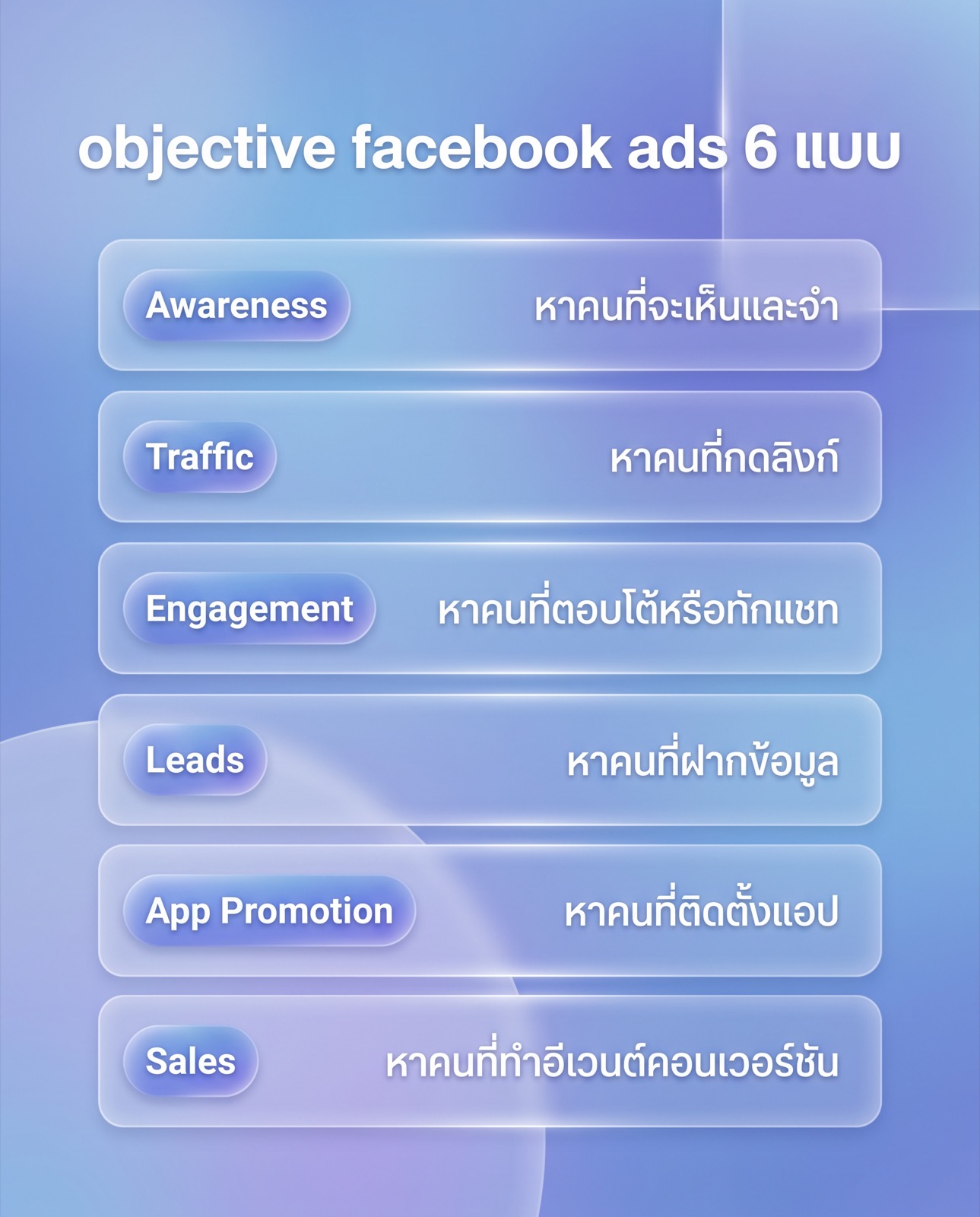
Meta Ads Manager now consolidates campaign objectives into six: Awareness, Traffic, Engagement, Leads, App Promotion, and Sales. The older set many advertisers remember, including Brand Awareness, Reach, Video Views, Post Engagement, Messages, Conversions, Catalog Sales, and Store Traffic, did not disappear. It was folded into these six as sub-choices, such as the conversion location, where the result happens, and which event to optimise for.
The point to hold onto is that an objective is not a statement of the result you want. It is a statement of the behaviour you are telling the system to go looking for. The first table covers the upper-funnel group.
| Objective | What Meta optimises delivery for | What to judge it on |
|---|---|---|
| Awareness | People likely to see and remember the ad, weighted toward reach and impressions | Reach, impressions, CPM, frequency, not revenue |
| Traffic | People likely to click the link and open the destination, whatever they do next | Link clicks, landing page views, cost per landing page view |
| Engagement | People likely to react to the post, watch video, send a message, or respond to an event | Cost per engagement, per video view, or per conversation started |
The remaining three tie directly to a downstream business result, and they need conversion signal flowing back into Meta before they can work properly.
| Objective | What Meta optimises delivery for | What to judge it on |
|---|---|---|
| Leads | People likely to submit their details through an instant form, a website form, chat, or a call | Lead volume, cost per lead, and how many leads sales can actually reach |
| App Promotion | People likely to install the app or complete an in-app event you define | Installs, cost per install, and the post-install events |
| Sales | People likely to complete the conversion event you select, such as Purchase on web or in app | Conversion count, cost per conversion, and conversion value against spend |
The classic mistake is picking Traffic because the clicks look cheaper, then hoping for sales. Traffic really does tend to show a lower cost per click, because the system is finding people who like clicking links, which is not the same as people who like buying. If the end goal is an order and a Purchase event is flowing back, choosing Sales and accepting a higher cost per click usually produces a lower cost per order.
The same trap sits between Engagement and Leads for businesses that close in chat. Optimise Engagement toward conversations started and the system finds people who like sending messages, including the ones who ask a question and vanish. Choose Leads with chat as the conversion location and send a signal back when a conversation becomes a real lead, and the system has different data to learn from.
How to measure Facebook ads properly
Start by accepting one thing. The numbers in Ads Manager are not raw truth. They are a picture drawn according to one set of crediting rules. Change the rules and the numbers change while real sales stay exactly the same. People who measure well are the ones who know what those rules are and hold them constant across every comparison.
The attribution setting
This setting lives at the ad set level and defines how many days after clicking or seeing an ad a conversion still gets credited to that ad. There are click-through windows and view-through windows, the latter covering people who saw the ad without clicking. The consequence is direct: switch from a short window to a long one and your reported conversion count rises immediately without the business selling anything more. So before comparing this month with last month, check that both data sets used the same window.
Modelled conversions
Since iOS introduced its cross-app tracking prompt and browsers tightened up on third-party cookies, a share of conversions is no longer observed directly. It is estimated from the patterns in the data that is available. This is why the reported figure can differ from the order count in your back office. Anyone who tells you an exact percentage of what goes unreported is guessing. What you can do is know the mechanism exists, and not panic when two systems disagree.
Why Ads Manager and a web analytics platform never match
They credit differently from the start. Meta credits the fact that someone clicked or saw an ad inside your attribution window, and usually reports the conversion back on the day of the ad click. A web analytics platform generally credits the source of the session in which the purchase happened, and records it on the purchase date. If someone sees the ad on Monday and comes back on Thursday by typing the brand name into search, the two systems log it in different places on different days. That gap is not a bug, it comes from different definitions. Pick one system as your decision-making source and use the other to sanity-check direction.
What the Meta Pixel and the Conversions API actually do
The Meta Pixel is code on your website that sends events from the visitor's browser back to Meta, such as viewing a product, adding to cart, starting checkout, or completing a purchase. The Conversions API sends those same events from your own server or store platform directly, without going through the browser. The benefit is that when a browser blocks the request or a user declines tracking, the server-side path can still deliver the event. When both are running you need to send a matching event ID so Meta can recognise the two copies of one event and count it once.
Build a baseline from your own account instead of hunting for benchmarks
The honest answer to "what is a good CTR" or "what should CPM cost in Thailand" is that no reliable public benchmark exists for it. The price of an impression depends on the auction inside your specific audience, the season, who else is bidding against you, the placement, and the quality of your creative. Another business's numbers cannot judge your account. What works is building a baseline from the account you actually run.
- In Ads Manager, open the Columns menu, choose Customise columns, and show at least Amount spent, Impressions, Reach, Frequency, CPM, Link clicks, link CTR, Results, and Cost per result. For online retail, add conversion value and ROAS.
- Save that column set as a preset so every review looks at the same view, rather than switching layouts and comparing different numbers each time.
- Pick a window long enough to contain dozens of results, and write down what you get as your account's starting baseline, kept separate per objective, because campaigns on different objectives cannot be compared directly.
- When comparing, use periods of equal length, the same attribution window, and similar conditions. Do not compare a discount week against a normal week.
- Use the Breakdown menu to split by placement, platform, age, and gender, so you can see where a difference comes from instead of reading one blended average.
A simple rule for separating signal from noise: if you can count the results in the compared period on your fingers, do not conclude anything yet. If the gap between two variants would flip with one or two more conversions, that is not a conclusion either. Let it collect more data, or push budget into the thing you are testing so the data arrives faster.
Name things and tag links so you can audit later
Use one naming pattern across campaigns, ad sets, and ads, encoding the objective, the audience, and the creative version in the name, then tag destination links with UTM parameters that match those names. When two systems disagree, you can trace which traffic came from which ad instead of arguing from memory.
What is different about running Facebook ads in the Thai market
The difference that affects campaign setup most is that a large share of Thai customers close the sale in chat rather than in a cart. The common path is seeing the ad, messaging to ask about price or stock, and finishing the deal inside the conversation. That means the real conversion happens off the website, where the Pixel cannot see it.
Three consequences follow. First, define what counts as a lead. One inbound message is not a lead, and if every message counts as a result, cost per lead will look beautiful while the sales team says the conversations go nowhere. Second, if you already record conversation outcomes in a chat platform or a CRM, sending the events that became real customers back through the Conversions API lets the system learn from quality instead of message volume. Third, creative and ad copy have to be written in Thai that makes the next step obvious. Copy translated word for word from an English campaign tends to read awkwardly and earn fewer clicks.
Timing differs too. During marketplace double-digit sale dates and long holiday periods, more advertisers crowd into the auction, so the cost of reaching the same audience can rise without you doing anything wrong. That is another reason to compare against your own period-over-period baseline rather than against a figure read somewhere else.
How to choose a Facebook ads service
If you decide to hire a team, the question to ask is not how much revenue they produced for someone else. It is whether their process can be inspected. Use this as your opening list.
- Which objective will they choose for your campaign, and can they explain why not the alternative?
- How will conversion signal be installed? Pixel only, or Pixel plus the Conversions API, and which events will be sent?
- Which attribution window will reporting use, and how will periods be compared?
- Who produces the creative, how often does it get replaced, and what signal tells them it is time?
- Do you or the agency own the ad account, the Page, the Pixel, and the datasets? If the history does not stay with you when the contract ends, you start from zero.
A team working systematically will also connect the Facebook campaign to the rest of the plan, for example moving site visitors into remarketing, extending into Instagram placements inside the same campaign, and reviewing all social channels together rather than reading one account in isolation.
Frequently asked questions about running Facebook ads
Which objective should I pick if I want sales?
Pick Sales and set the conversion event to the completed purchase, on the condition that your website can genuinely send that event back through the Pixel or the Conversions API. Without conversion signal returning, the system has no data telling it who the buyers are. In that case, install measurement first and open the Sales campaign afterwards.
Why do sales in Ads Manager not match the orders in my back office?
Because the two systems credit by different rules and record on different days. Meta counts conversions that happen inside the attribution window you set and usually reports them back on the day of the ad click, while your back office records on the order date. On top of that, some conversions are modelled because of device and browser tracking limits. Choose one system as your decision source and use the other to check direction.
How much daily budget is enough?
There is no universal number, because enough budget means enough for an ad set to accumulate results fast enough for the system to learn, which depends on your own cost per result. Estimate it by looking at the cost per result your account has actually produced recently, then setting a daily budget that yields several results per day per ad set. If that is out of reach, cut the number of ad sets instead of spreading a thin budget across all of them.
My ads only bring people who ask the price then disappear. What do I fix?
Start by redefining what counts as a result, then send that signal back to Meta. If you tell the system to find people who like sending messages, it will bring you people who like sending messages. The fix is to count only conversations that pass a threshold, such as requesting a quote or completing the details you need, send that event back through the Conversions API, and write the ad to qualify people up front by stating price ranges and conditions.
Should I split Facebook and Instagram into separate campaigns?
Not at the start. One campaign can deliver to both and the system will push budget toward whichever placements perform better. The better approach is to keep them together first, then use the Breakdown menu to split by platform and placement. If one placement is clearly different and has enough data behind it, give it its own ad set with creative built for that placement.
If you have read this far and recognise your account in the objective mismatch or the measurement gap, this is the work the team at Relevant Audience handles, both the campaign structure and the tracking setup behind it. Read more about the Facebook ads service, or talk to the team about your whole paid social picture through Relevant Social Ads.