Here’s something most marketing teams don’t realize: if you’re running Performance Max campaigns right now, there’s a very good chance your brand is already showing up on connected TVs — living room screens, smart TVs, streaming devices — and you probably didn’t plan for it.
According to Google’s own data, roughly eight in ten Performance Max advertisers are already receiving CTV impressions through YouTube. That’s not a future prediction. That’s what’s happening right now while marketing teams are focused on conversion rates, ROAS targets, and feed optimization. Meanwhile, product images pulled directly from your Shopping feed may be running as ads on 65-inch screens in people’s living rooms.
This isn’t meant to cause panic. It’s meant to prompt a closer look. CTV campaigns are already running in your PMax — here’s what marketing teams need to know to stay in front of it.

The shift matters because CTV is no longer some niche, opt-in channel that only big-budget brands worry about. If you’re using PMax, you’re already there. The question is whether you’re managing it intentionally or just letting automation make all the decisions.
How PMax Quietly Put Your Brand on Connected TV
Google didn’t make a loud announcement when it started pushing Shopping feed images into CTV placements. It happened gradually, through a series of product updates that expanded what Performance Max could do automatically — without advertisers needing to take any action to trigger it.
Understanding how this happened is important for marketing teams because it reframes the conversation. CTV is not something you added to your media mix. It was added for you. And knowing the timeline helps you explain that to stakeholders and make a stronger case for why creative investment matters more than ever.
The Timeline: From Shopping Feed to TV Screen
Starting in Q2 2025, Google began automatically converting standard product feed images into CTV-ready ad formats within PMax. No video assets required. No opt-in. If you had product images in your Merchant Center feed and an active PMax campaign, your creative was eligible to run on CTV inventory through YouTube.
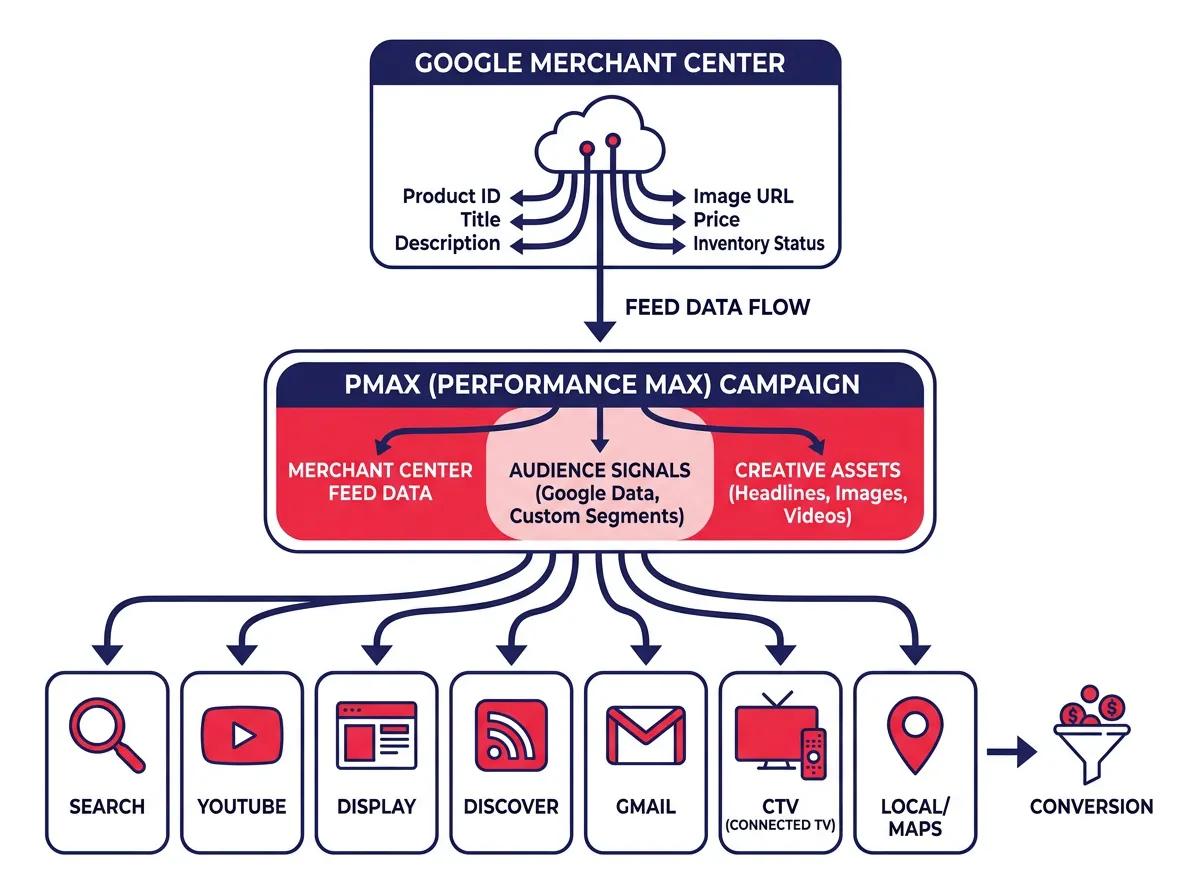
This was part of a broader Google push to make PMax more capable across all of its inventory — Search, Display Advertising, YouTube, Gmail, Maps, and Discover — without requiring advertisers to manually create assets for every placement. The logic makes sense from a reach and efficiency standpoint. The problem is that most marketing teams weren’t briefed on what this meant for creative quality or budget allocation.
Then in January 2026, Google rolled out shoppable CTV ads through PMax, a format that lets viewers interact with product listings directly from their TV screen. Using QR codes, someone watching a YouTube video on their smart TV can open a product detail page on their phone and complete a purchase without ever leaving their couch.
These shoppable formats pull directly from Google Merchant Center feeds, which means the same product data powering your Shopping campaigns is now fueling what are essentially interactive TV commercials. For commerce-focused teams, that’s a significant development.
Shoppable CTV Ads and What They Mean for Commerce Teams
The shoppable CTV format represents a real shift in how lower-funnel commerce can work on TV. Historically, TV advertising was an upper-funnel play — brand awareness, reach, frequency — because you couldn’t click on a TV. The QR code model changes that by creating a bridge between the living room screen and a mobile purchase flow.
For teams invested in Ecommerce Marketing or DTC brands, this is worth understanding in detail. Shoppable CTV through PMax means your product catalog is doing the creative heavy lifting. Feed accuracy, image quality, pricing clarity, and product title optimization are no longer just Shopping campaign concerns. They now directly affect how your brand looks and performs on TV inventory.
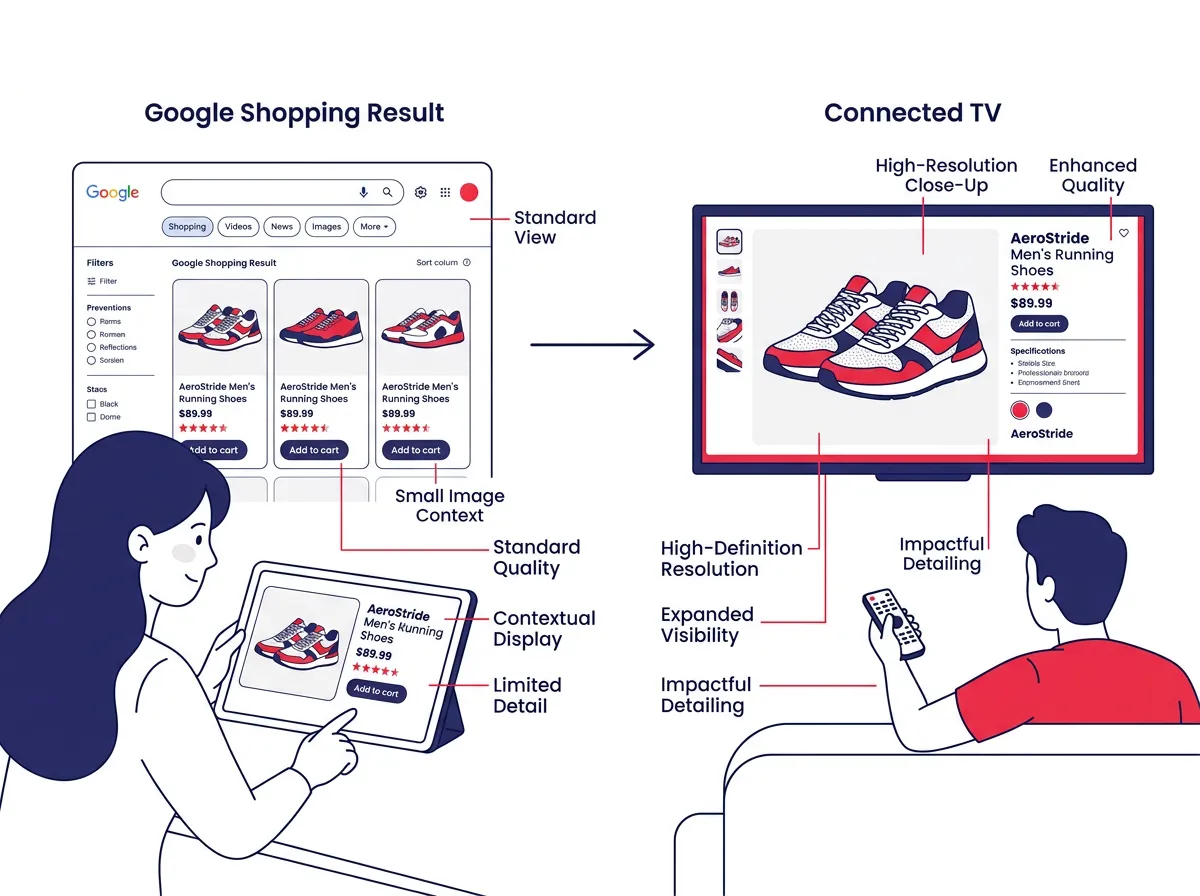
A product image that looks fine at a small tile size in a Shopping result can look completely different — and not in a good way — when it’s scaled up to fill a large TV screen. That’s the core tension marketing teams need to grapple with.
Why Your Marketing Team Should Care About CTV Spend Visibility Right Now
Budget accountability is a core part of every marketing team’s job. You’re expected to know where the money goes, what it produces, and whether the return justifies the spend. CTV within PMax has created a visibility gap that undermines all three of those expectations — not because the channel is bad, but because most teams haven’t taken the steps to surface the data.
Where Is Your PMax Budget Actually Going?
PMax is a notoriously opaque campaign type when it comes to spend attribution. Google controls how budget flows across channels based on its predictions about where conversions are most likely to come from. That’s the promise of the product. But the tradeoff is that you can end up with significant spend going to placements you weren’t aware of.
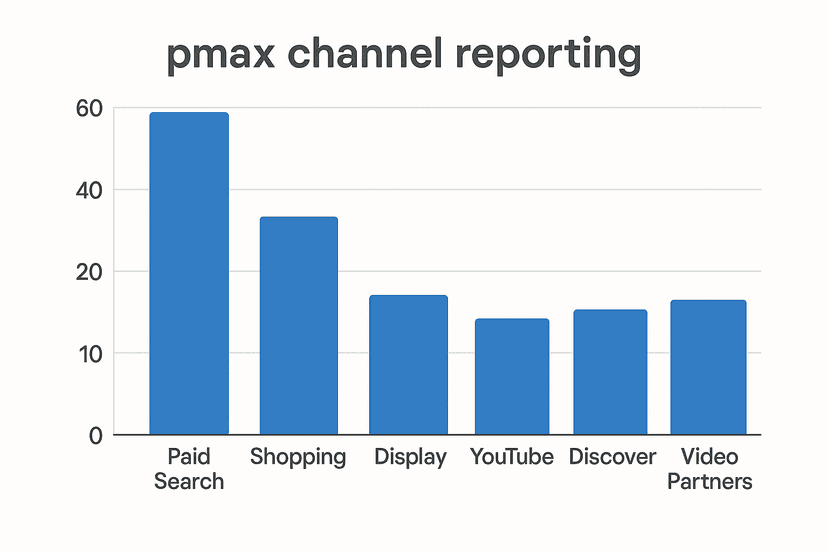
Without pulling the Channel Performance report — which is available in Google Ads under the campaign-level reporting section — marketing teams have no visibility into how much of their PMax budget is flowing to CTV specifically. And if auto-generated creative from low-quality feed images is being served on TV inventory, you’re essentially paying for impressions that may be working against your brand perception, not for it.
This isn’t theoretical. A product photo taken on a white background at 800×800 pixels, resized and repurposed as a CTV ad, may look pixelated, unbranded, and completely out of context when it’s running between YouTube TV segments. Users watching TV content have very different expectations than someone scanning a Google Shopping results page.
The urgency here is real. CTV CPMs can be higher than some other digital formats because of the lean-back, high-attention environment. That premium spend deserves premium creative. What’s happening in many PMax accounts right now is the opposite — premium inventory, budget spend, and auto-generated creative that wasn’t designed for the format.
The Creative Problem: Product Photos Were Not Built for a 65-Inch Screen
YouTube has now surpassed mobile as the number one viewing device in the United States by total watch time, and it has held the top position among streaming platforms for two consecutive years. That’s not a niche audience. That’s the mainstream.
When you combine those viewership numbers with the fact that your PMax campaigns are actively running on CTV inventory, the creative quality gap becomes a serious business issue. You’re not running a small test in a secondary channel. You’re placing your brand in front of a massive audience on the biggest screen in someone’s home.
Feed images were built for utility. They’re designed to communicate product details at a glance to a high-intent shopper who is already in buying mode. TV advertising works differently. The viewing context is passive, the attention span expectations are higher, and the visual standards are set by professionally produced content. A flat white-background product photo sitting next to a Netflix-level production is not a fair fight.
Marketing teams that understand this gap have an opportunity right now to get ahead of competitors who are still relying entirely on automation to manage their CTV presence.
What Marketing Teams Should Do About Their CTV Campaigns Right Now
Knowing that your CTV campaigns are already running is step one. Knowing what to do about it is what separates teams that manage their PMax spend with intention from those who are just along for the ride.
The good news is that the starting point isn’t complicated. You don’t need to build out a full Content Marketing strategy before you can start making improvements. You just need a baseline understanding of what’s happening and a plan to move toward better.
A Three-Step Audit Every PMax Advertiser Should Run
Step 1: Pull the Channel Performance Report
In Google Ads, navigate to your PMax campaign, open the Insights and Reporting section, and look for the Channel Performance report. This report breaks down how your budget is being distributed across Google’s inventory types, including YouTube and CTV. Look specifically at CTV impression volume, spend allocation, and any conversion data associated with those placements. This gives you the factual baseline you’ve been missing.
Step 2: Audit Your Feed Image Quality
Go through your Merchant Center feed with CTV in mind. Are your product images high resolution? Do they have clear visual context, or are they purely on white backgrounds? Are your product titles and descriptions accurate and compelling enough to support a shoppable format? Rate your feed quality through the lens of someone seeing your products for the first time on a TV screen, not a search results page.
Step 3: Verify Shoppable CTV Eligibility and Performance
If your account is eligible for shoppable CTV formats, check whether these are active and how they’re performing. Look at QR code engagement metrics if available, and compare conversion rates from CTV placements against other PMax channels. This helps you understand whether the format is driving real outcomes or consuming budget without measurable return.
These three steps give you what you need to start managing CTV spend with intentionality instead of just accepting whatever Google’s automation decides to do with your budget.
From Auto-Generated to Purpose-Built: Raising the Creative Floor
Once you’ve completed the audit, the next conversation is about creative investment. Feed images as CTV ads are a starting point, but they are not a strategy. Teams that invest in purpose-built video assets — even short-form, 15-second or 30-second cuts specifically optimized for the TV viewing environment — will consistently outperform those relying on automation to handle creative decisions.
Purpose-built CTV creative should tell a story, not just show a product. It should include a clear brand presence, a visual hierarchy that works on a large screen, and a call to action that makes sense for the viewing context. For shoppable formats, that means thinking through the QR code flow — what does someone see when they scan? Is the landing page mobile-optimized? Is the checkout experience fast enough to capture intent before it fades?
You don’t have to overhaul your entire creative production process to make progress here. Even upgrading your product imagery to lifestyle-style photography that shows the product in real-world context can meaningfully improve how your auto-generated CTV ads perform. Better source material means better outputs from Google’s automation.
The marketing teams winning in PMax right now aren’t necessarily the ones with the biggest budgets. They’re the ones who took the time to understand what the platform was doing with their assets and then made deliberate choices to improve it. CTV is the latest version of that challenge — and the teams that engage with it now will be better positioned than those who find out about it six months from now when a competitor is already ahead.
The data is there. The channel is live. The only thing left is the decision to look.